

What Is Topical Authority?
Imagine you’re researching a topic you know nothing about, say “email marketing.” You find two websites:- Site A - Has one article called “Email Marketing Tips” (800 words). No other related content.
- Site B - Has a comprehensive guide called “The Complete Guide to Email Marketing” that links to 15 detailed articles: “How to Write Welcome Emails,” “Best Email Marketing Tools,” “Email Open Rate Benchmarks,” “A/B Testing Subject Lines,” and more.
Why Random Articles Don’t Work Anymore
Publishing one-off blog posts worked 10 years ago when competition was low. Today, every topic has thousands of articles competing for the same keywords. A single 1,500-word article is no longer enough to rank, because Google has learned that the most comprehensive resources on a topic are the ones users actually want. The difference between winning and losing in SEO today:Google rewards depth and interconnected expertise. A cluster gives you one place to see how much of a topic you’ve covered, and how visible you are for it in both search and AI answers.
How SnowSEO’s Topic Clusters Work
A cluster is a named group of the keywords and AI prompts you want to win. You open Planning → Topic Clusters to manage them. Everything lives on one page, in two views, with a detail dialog for each cluster:- List view - A sortable, paginated table of every cluster with its coverage and authority score
- Map view - A honeycomb map of every cluster and the keywords and prompts inside it
- Cluster details - A dialog with the score, trend, gainers and decliners, and the cluster’s keywords and prompts
The List View
Summary strip
Four numbers at the top summarize your whole topical strategy:
Search and AI visibility show a dash until you track keywords or prompts in a cluster.
The clusters table
Sort by cluster name, keywords, prompts, coverage, or topical authority (including its change). The search box filters by cluster name, and the table is paginated (20 per page by default).
How the authority score reads:
The score blends content coverage, search visibility and AI visibility. Visibility only counts what you track, so a cluster with tracking off is scored on coverage alone. You can still plan and write articles for it.
Row actions
Hover a row and click the ⋮ menu:- Plan an article - Picks the best keyword and prompt in the cluster to cover next, then lets you choose a title and schedule it
- Add keywords / Add prompts - Add more to this cluster
- Start tracking - Appears when something in the cluster isn’t tracked yet
- Rename
- Delete - Keywords and prompts are unlinked but stay in your lists. Planned articles for the cluster are deleted with it, and published articles stay, without a cluster
Bulk actions
Tick rows (selection is kept across pages) to get Track, Untrack and Delete for the selection. Tracking a cluster starts tracking everything already inside it. Prompt tracking uses credits, and if you run short the rest are skipped and you’re told how many.The Map View
Switch to Map view with the toggle above the table. Every cluster appears as a hexagon hub, surrounded by its keywords and prompts. Pan and zoom, or go fullscreen. Each keyword or prompt is colored by status:
Keywords and prompts differ by shape. Click any one to plan an article for it, add an opportunity to the cluster, or see the articles that cover it. Use Filter to narrow the map by coverage (Uncovered or Used), type, gaps only, difficulty (Easy, Medium, Hard), or high volume (1k+), and the search box to find a cluster.
Creating Clusters
Click New cluster and pick a way to start:- Auto-create from Search Console - Groups the searches you already show up for into clusters. Choose the query window (30 days, 3 months or 6 months), how many keywords to use, and the number of clusters (Auto, Fewer or More). Optional toggles add questions as AI prompts, reuse your existing clusters, and start tracking right away. You review the proposed clusters before they’re created. Requires Google Search Console to be connected. Grouping costs 1 credit per 100 keywords.
- Ask Snowy - Suggests clusters based on what your brand does.
- Create manually - Name the cluster (or pick an AI suggestion), then choose keywords and prompts from the ones you already track or type new ones.
A good cluster is broad enough to have at least 5-10 sub-topics. “Email Marketing” is great because you can write about deliverability, subject lines, automation, tools, analytics, compliance, and more. “Best Time to Send Marketing Emails” is too narrow, since that’s a single article, not a cluster.
Cluster Details
Click a cluster to open its details dialog.Header
- Leaders - Favicons of the top competing brands detected in AI responses for this cluster
- Date range picker - Sets the window for the charts and tables
- ⋮ menu - Shows how many keywords and prompts are tracked, with Track everything / Stop tracking (nothing is deleted when you stop; the checks just end) and Export
Topical authority score and trend
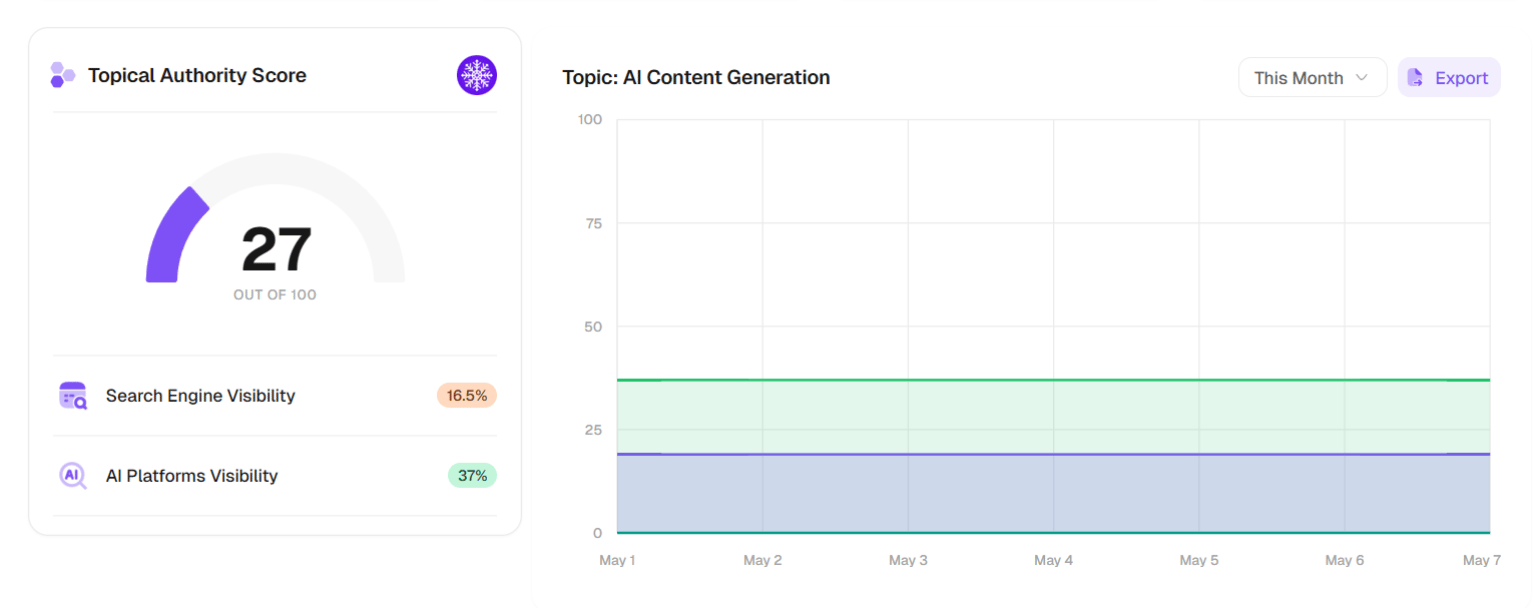
A gauge shows the cluster’s score out of 100, with Search Engine Visibility and AI Platforms Visibility underneath. Next to it, a trend chart plots Authority Score, Search Engine and AI Platforms over your chosen window. These only appear once the cluster has scored. How to read the chart:- All three lines moving up = your topical strategy is working
- Search up but AI flat = your content ranks on Google but isn’t structured well for AI citation (check your GEO Audit)
- AI up but Search flat = AI tools find you authoritative, but Google hasn’t fully recognized your depth yet (keep publishing)
- Both flat or declining = the cluster needs attention (update content, add new articles, improve internal links)
Biggest Gainers and Needs Attention
Two tables show where to focus. Biggest Gainers lists keywords and prompts that are improving, and Needs Attention lists those declining. Switch each between Keywords and Prompts (position for keywords, share of voice for prompts). They appear once there is movement to show.Keywords under this Topic
- Search, and an All / Ranked filter
- Add New Keyword - Single keyword or Bulk import
- Generate Strategy - Coming soon
Click a row to open Ranked Pages, which shows which of your pages rank for the keyword, with positions and CTR. Select rows for bulk Track, Untrack, Move and Remove.
Prompts under this Topic
The AI-visibility side of the cluster, showing how AI assistants talk about your brand for these questions.- Search, an All / Mentioned filter, and Add New Prompt
- Columns include Mentions, Visibility, Position, SOV (share of voice), Sentiment and Competitors
- Row actions: track or untrack, Schedule article, Move to another topic, Remove from topic. Bulk actions work like keywords
The Full Workflow: From Zero to Authority
1
Create a cluster
In Planning → Topic Clusters, click New cluster. The fastest start is Auto-create from Search Console, or let Ask Snowy suggest clusters.
2
Add keywords and prompts
Open the cluster and add 5-10 keywords that represent the sub-topics you want to cover, plus questions your audience would ask an AI assistant. You can also add keywords straight from Keyword Research.
3
Plan articles for the gaps
Use Plan an article on the row, or click uncovered items on the Map view. Check the Coverage column to see what’s still open.
4
Start tracking
Use Start tracking (or Track everything in the details dialog) to measure search and AI visibility for everything in the cluster.
5
Monitor and iterate
Check the trend weekly. Act on Needs Attention, repeat what’s in Biggest Gainers, and keep adding keywords and prompts as the cluster grows.
What Makes a Strong Topic Cluster?
Not all topics are created equal. Here’s what separates a cluster that ranks from one that doesn’t:The pillar page must be comprehensive
The pillar page must be comprehensive
Your pillar page is the center of your cluster. It should be the most thorough resource on the topic, not a thin overview. Aim for 2,000-5,000 words. It should answer the big question (“What is email marketing?”) and link out to cluster pages for deeper dives on each sub-topic. Without a strong pillar, your cluster has no foundation.
Each cluster page should answer one specific question
Each cluster page should answer one specific question
Every supporting page should have a single, clear purpose. “How to A/B Test Subject Lines” is a focused page. “Email Marketing Tips” is too broad, which is pillar territory. If two pages overlap, merge them.
Links must go both directions
Links must go both directions
The pillar links OUT to all cluster pages, and every cluster page links BACK to the pillar. This is what tells Google the pages are related. Generated articles include internal links to your other pages, and you can add or adjust them in the article editor.
Publish cluster articles close together
Publish cluster articles close together
For maximum impact, publish your cluster articles within a 2-4 week window. Several related articles appearing around the same time is a strong signal that you’re systematically building expertise. Scheduling them on the content calendar makes this easy.
Frequently Asked Questions
What exactly is a topic cluster?
What exactly is a topic cluster?
In SnowSEO, a cluster is a group of keywords and AI prompts around one theme, plus the articles that cover them. In SEO terms, it is a set of interlinked articles organized around one main “pillar” page that covers a broad topic, with supporting pages on each sub-topic. Together they signal to Google that you’re an authority on the whole subject.
How is a topic cluster different from just writing a lot of articles?
How is a topic cluster different from just writing a lot of articles?
Random articles don’t reinforce each other. A cluster is intentionally structured so every piece of content strengthens the others through internal linking. Think of it as building a library vs. scattering pamphlets.
How many keywords should I put in one topic?
How many keywords should I put in one topic?
Start with 5-10 keywords for a new cluster. As you publish and the cluster gains traction, expand to 20-30. The goal is comprehensive coverage, not keyword stuffing.
How long does it take to see results from a topic cluster?
How long does it take to see results from a topic cluster?
Typically 2-4 months for new clusters to build meaningful visibility. If you already rank for some keywords in the topic, you might see movement in 4-6 weeks. Publishing consistently and keeping internal links in place matter most.
I already have articles. Can I build a cluster around them?
I already have articles. Can I build a cluster around them?
Yes. Create the cluster, then add the keywords and prompts those articles target. Coverage is calculated from your existing articles, so what’s already covered shows up right away and the rest is flagged as open.
Does SnowSEO help me find what keywords to put in my cluster?
Does SnowSEO help me find what keywords to put in my cluster?
Yes. Auto-create from Search Console groups the queries you already get impressions for. Keyword Research lets you add ideas to a cluster in one click. In Map view, Opportunity items are queries competitors win that you don’t target yet.
Can I have the same keyword in multiple topics?
Can I have the same keyword in multiple topics?
Use it sparingly. Overlapping clusters can lead to two of your pages competing for the same query. When you create an article, SnowSEO runs a cannibalization check against your published articles, planned articles and existing site pages, and warns you about overlap so you can choose a distinct angle.
Can I export my topic data?
Can I export my topic data?
Yes. Open the ⋮ menu next to New cluster and choose Export, pick a date range, and download a ZIP with a summary CSV of all clusters and a folder per cluster containing score, keyword and prompt CSVs. You can also export a single cluster from its details dialog.
What does tracking do?
What does tracking do?
Tracking a cluster starts monitoring everything inside it: keywords get rank position updates, and prompts are run against AI Platforms to see whether your brand is mentioned. Prompt runs use credits. Stopping tracking ends the checks but keeps all historical data, and you can turn it back on anytime.