
Track how often AI tools like ChatGPT, Perplexity, and Google Gemini cite your brand as a trusted source.
Ranking #1 on Google used to be the ultimate goal. But today, a growing number of users skip Google entirely and go straight to ChatGPT, Perplexity, or Google’s AI Overviews for answers. If these AI tools don’t reference your brand, you’re invisible to those users — regardless of your Google ranking.AI Visibility measures exactly that: how often AI-generated answers use your website as a source, and how you compare to competitors for the same topics.
You can rank #1 in traditional Google search and still be completely ignored by AI. SnowSEO helps you close that gap.
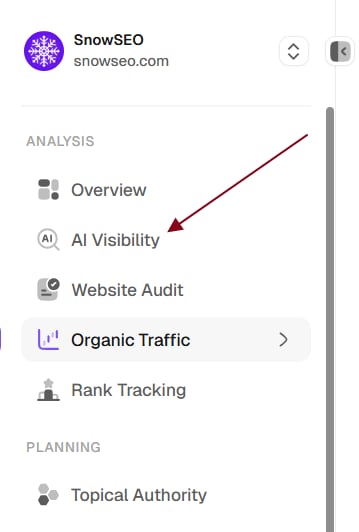
In the sidebar, go to Analysis → AI Visibility and confirm you’re inside the correct Brand workspace. If you manage multiple sites, switch to the right Brand first.
2
Enable AI platforms for your team
Before you can track prompts, your team needs at least one AI platform enabled. Go to Settings → Automation Settings → AI Visibility and enable the platforms you want to use (ChatGPT, Claude, Gemini, Perplexity, etc.). Without active platforms, the “Add Prompts” button will show a “No AI Providers Enabled” prompt.
3
Add your first prompts
Go to the Prompts tab and click Add Prompts → Single prompt or Bulk import. Enter search queries that your potential customers would ask — for example:
“What’s the best CRM for small businesses”
“How to improve website traffic”
“[Your brand name] vs [competitor]”
Prompts that mention your brand will be automatically classified as Branded; others are Unbranded.
4
Wait for initial processing
Each prompt is processed against every enabled AI platform. Processing time depends on the number of prompts and platforms — typically 24–48 hours for initial data. You can check progress in the Prompts table (processing prompts show a spinner).
5
Review your baseline metrics
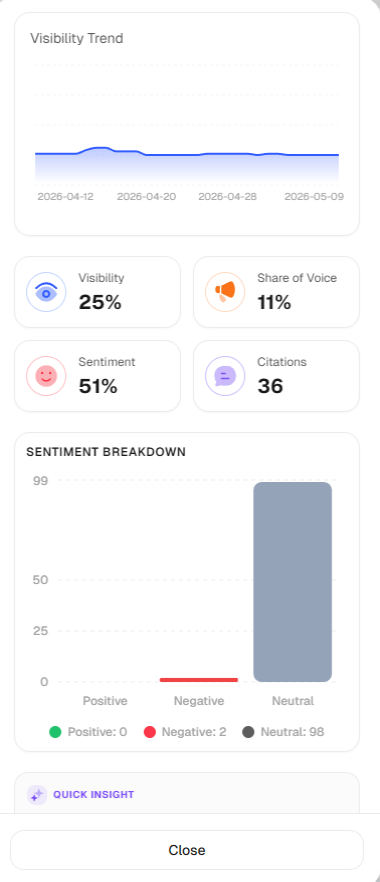
Once processing completes, note your AI Visibility score, Share of Voice, Citations, and Sentiment on the Overview tab. These are your baselines for measuring progress. Use the date range filter to see how metrics change over time.
6
Explore competitive insights
Open the Competitors tab to see all detected competitors, their visibility scores, and your Share of Voice. Use the Citations tab to understand which of your pages are being cited most often by AI.
7
Track weekly and iterate
Prompts refresh automatically based on your plan’s refresh interval (default 15 days). Check the Competitors and Citations tabs weekly to monitor trends and identify new competitors or citation opportunities.
New projects usually need 24–48 hours for initial data population. After that, metrics refresh on each prompt’s scheduled cycle.
Don’t just track generic industry queries — add prompts that include competitor brand names. For example, if you’re a CRM company, track prompts like “HubSpot vs [your brand]” or “best CRM for startups [competitor].” This reveals exactly how AI positions you against specific rivals and uncovers visibility gaps you wouldn’t see from generic prompts alone.
SnowSEO tracks your brand’s presence across AI platforms by regularly running tracked prompts — search queries relevant to your industry — against multiple AI platforms. Each time a prompt runs, SnowSEO:
Sends the prompt to your activated AI platforms (ChatGPT, Claude, Gemini, Perplexity, Grok, DeepSeek, Meta Llama)
Collects the raw AI response text
Extracts every brand mentioned, their position in the response, sentiment, and cited sources
Computes visibility metrics based on how prominently your brand appears compared to competitors

This process runs automatically on a refresh cycle (configurable per plan, default 15 days) so your data stays current without manual intervention.
The AI Visibility dashboard has four tabs, accessed from Analysis → AI Visibility in the sidebar: Overview, Competitors, Citations, and Prompts.
Overview
Competitors
Citations
Prompts
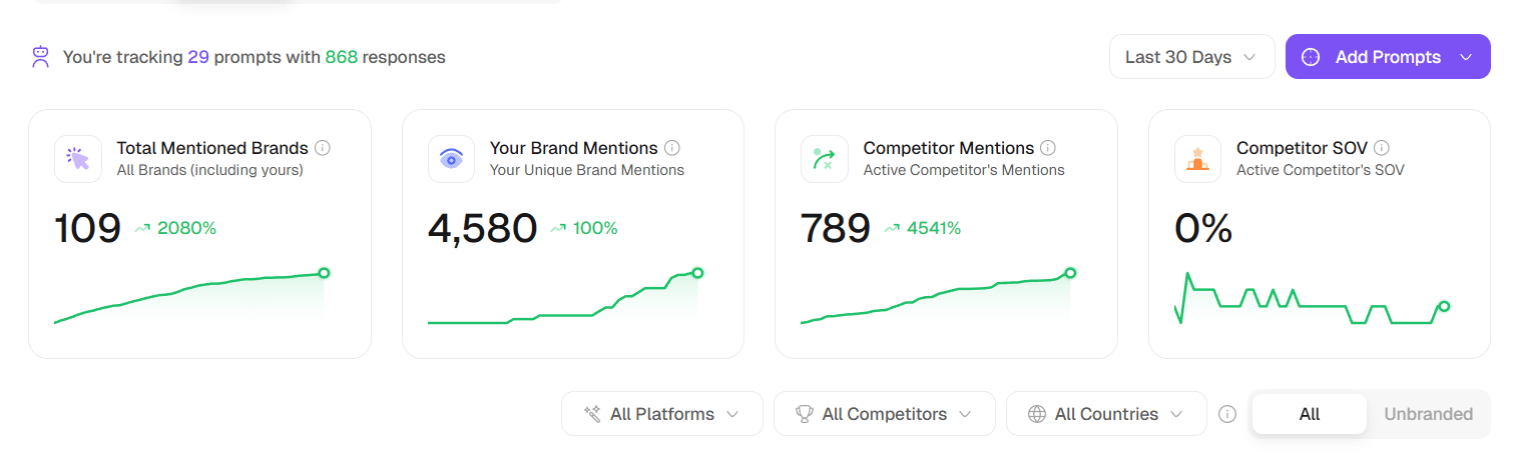
The Overview tab is your at-a-glance summary of how your brand is performing across AI platforms — visibility, share of voice, citations, sentiment, and how you stack up against competitors. Everything here respects the global filters at the top of the page.
Brand Visibility — a multi-brand line chart of visibility over time. Use the brand/segment filter to choose which brands to compare (up to 5 at once), and pin your own brand to keep it in view.
Leaderboard — a ranked table of brands by visibility, with columns for Brand, Mentions, Visibility, DR (Ahrefs Domain Rating, 0–100), and Position (average rank, color-coded by tier).
Brand VS Competitors — a radar chart comparing your brand against a selected competitor across Visibility, Mentions, Citations, Sentiment, and Share of Voice.
Performance Comparison — a table with the same five metrics for your brand, the chosen competitor (or the average competitor), and the difference.
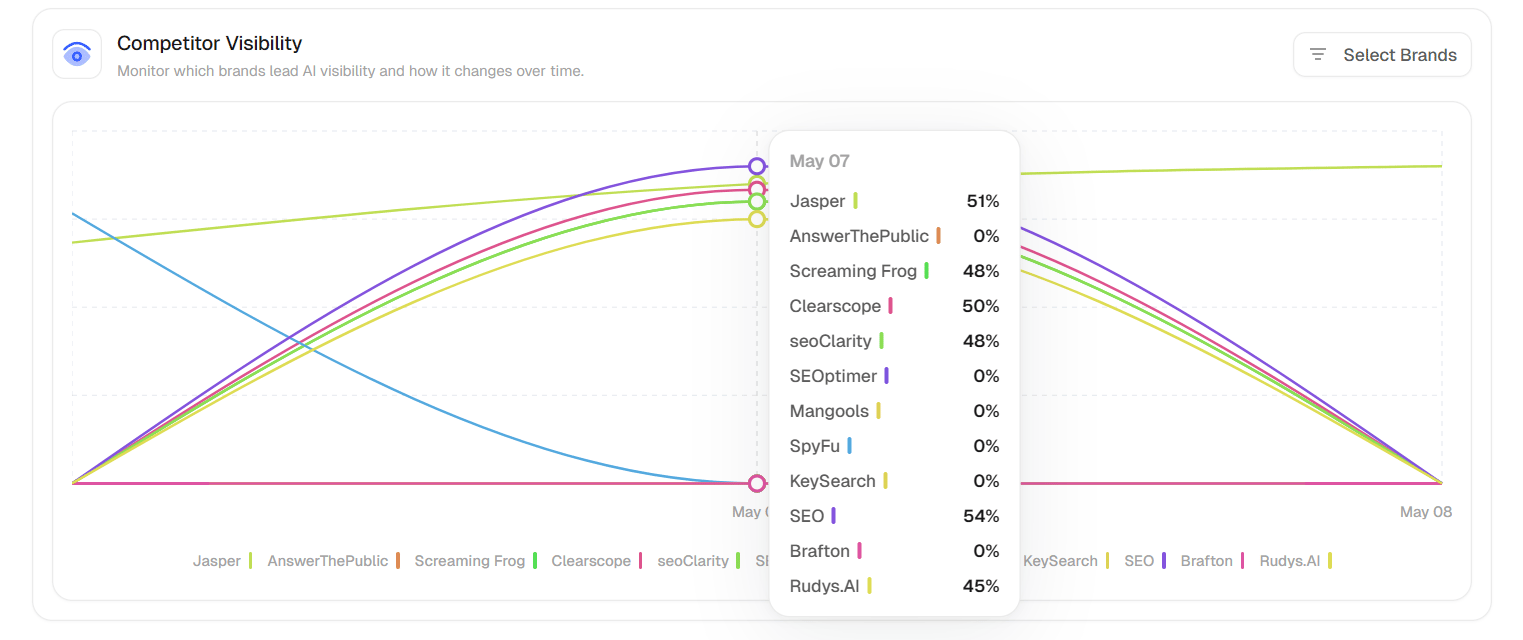
Click View All to open the full Competitors tab.
The Competitors tab gives you a competitive intelligence view — it shows every brand detected in AI responses and how they stack up against each other.
A line chart comparing visibility trends over time for selected brands. Use the filter panel (All / Segments tabs) to choose which brands to compare. You can select up to 12 brands at once.
Select a specific competitor from the dropdown to see a benchmark bar chart comparing your brand against them across Mentions, Citations, Share of Voice, and Sentiment. The tooltip shows the exact gap value.
Toggle between Chart View (bar chart showing SOV distribution) and Table View (sortable table with columns: Brand, Share of Voice, Mentions, Analysed Responses, Top Platform, SOV Change).Each row shows a Growing or Declining badge so you can instantly see which brands are gaining or losing AI mindshare. Pin your brand to keep it fixed at the top.
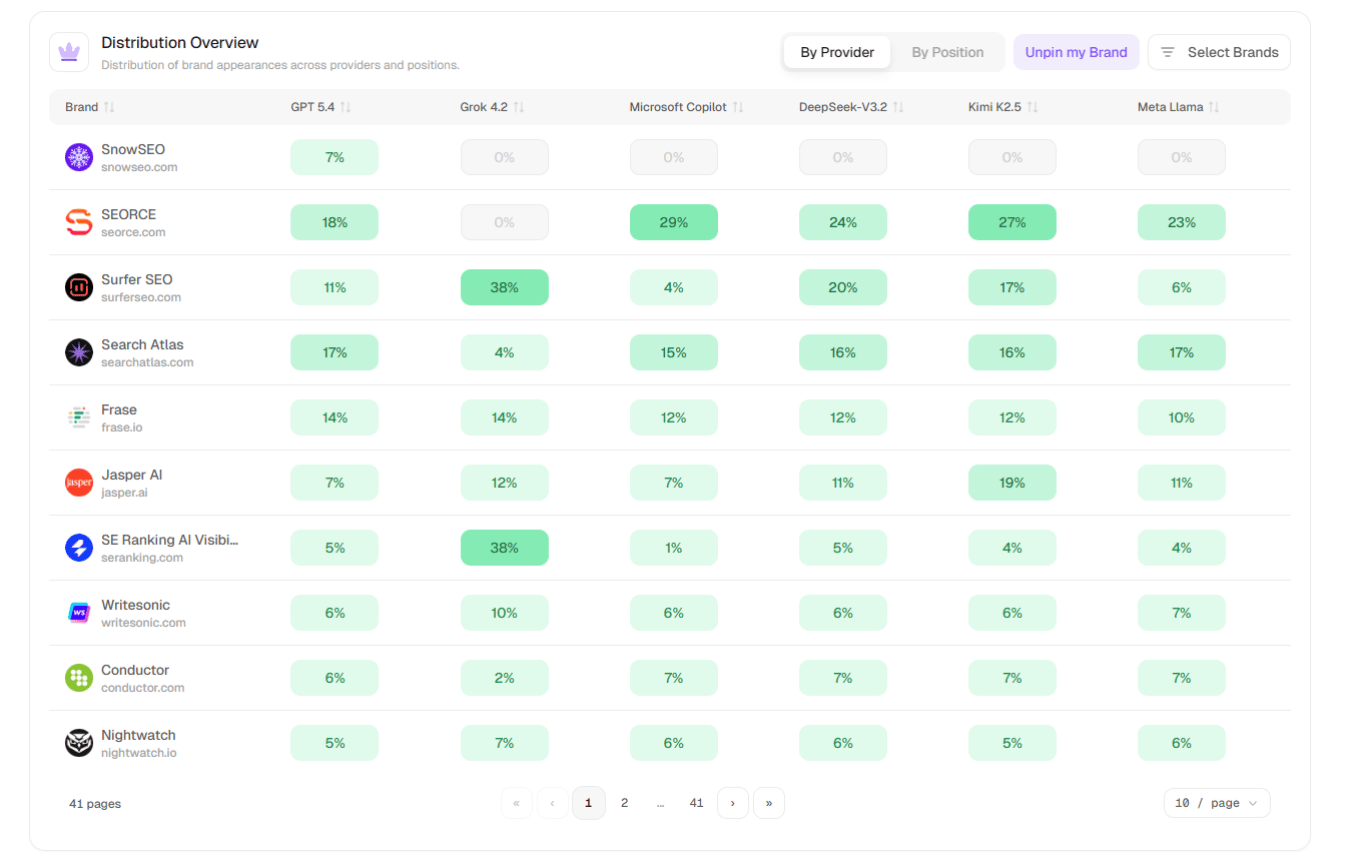
Toggle between By Provider and By Position views. A color-coded data table shows the percentage share each brand has per AI provider or per position rank (#1 through #5+). Hover any cell to see the exact brand name and share value.
Brands are segmented using quartile distribution based on a composite score: 40% SOV + 30% mentions + 30% visibility. Momentum badges like “Growing” and “Declining” help you spot movers.
Keep an eye on the Emerging segment filter — these brands are gaining traction in AI responses but aren’t yet dominant. An emerging competitor today could be your biggest AI visibility threat next quarter. Check this filter monthly to spot rising rivals before they become established names in your space.
Click any row to open the Brand Summary sidebar.
The Citations tab shows exactly how and where your brand is being cited in AI responses — which pages, which domains, and which AI platforms.
Toggle between Chart View (line chart comparing citation frequency over time for top domains) and List View (sortable table with columns: Source, Citation Share, Citations, Type).
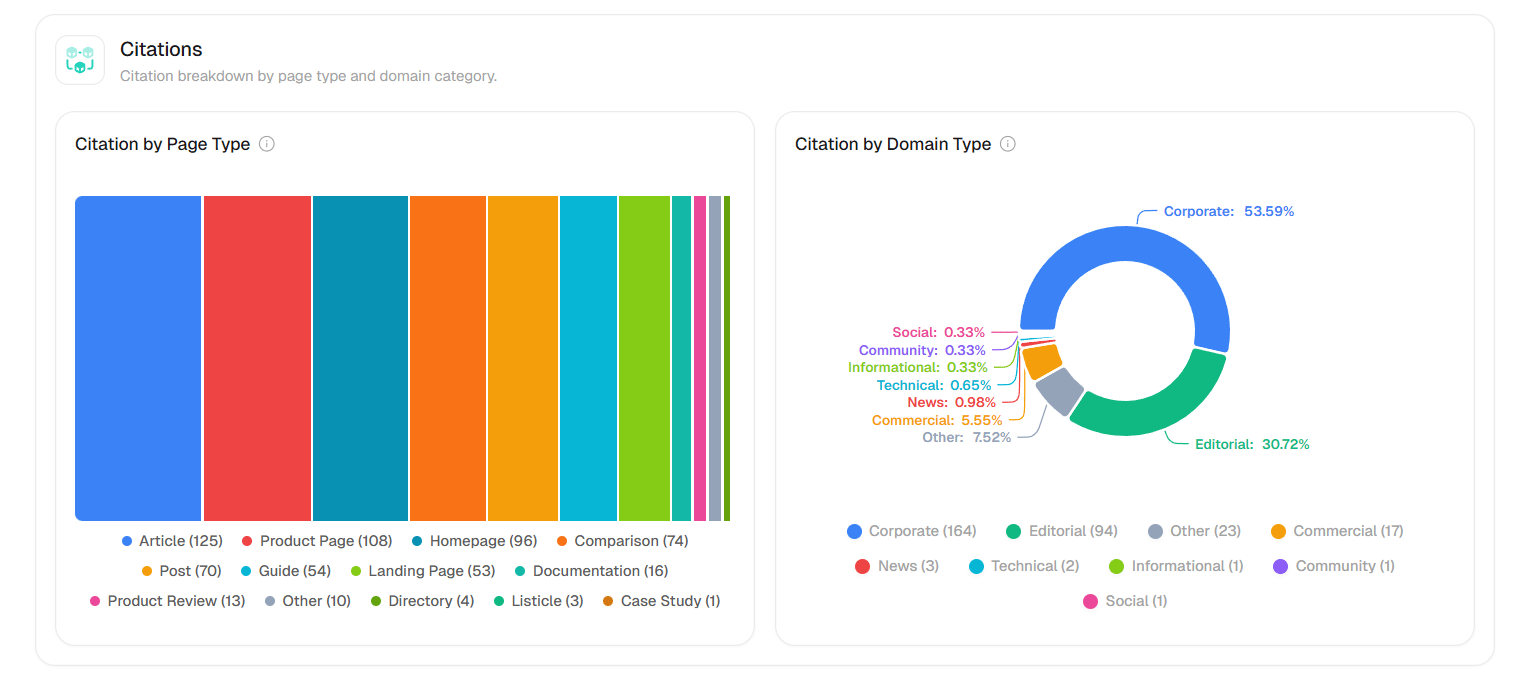
Two charts showing what kind of content gets cited:
Citation by Page Type — A treemap showing the distribution of cited content types: article, listicle, guide, comparison, news, post, product page, how-to, review, and more (20+ types inferred from URL patterns).
Citation by Domain Type — A donut chart showing source domain categories: corporate, editorial, news, community, social, government, educational, and more (15+ types inferred from hostname patterns).
Use the Citation by Page Type treemap as your content roadmap. If AI is citing mostly “how-to” guides and your site mainly has blog posts, pivot your content strategy toward structured, step-by-step guides. The formats AI cites most in your industry are a direct signal of what to create next.
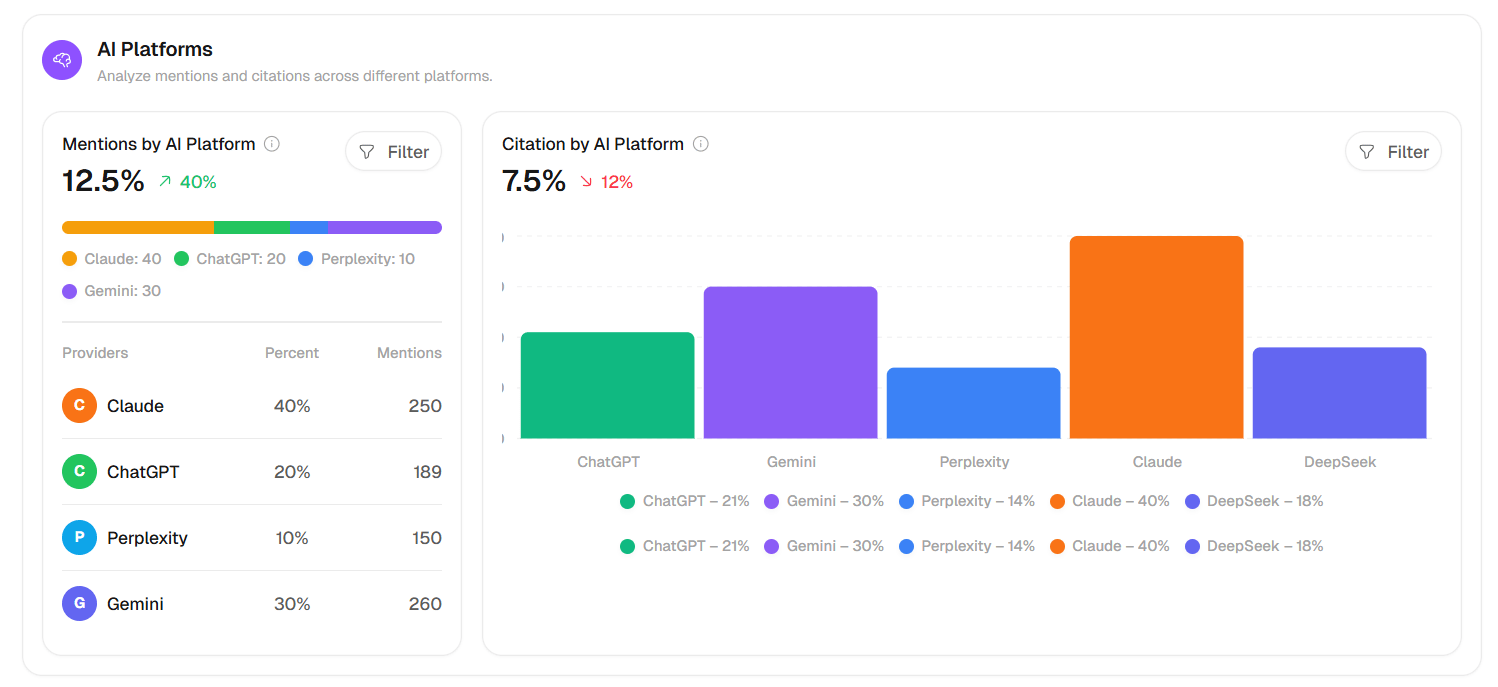
A breakdown of citation frequency by AI provider. Toggle between Mentions (bar chart showing how many times each platform cited you) and Position (average rank per platform).
Expand any domain row to see the individual child URLs from that domain. Use the search box to find specific sources, and pin your brand to keep it visible.
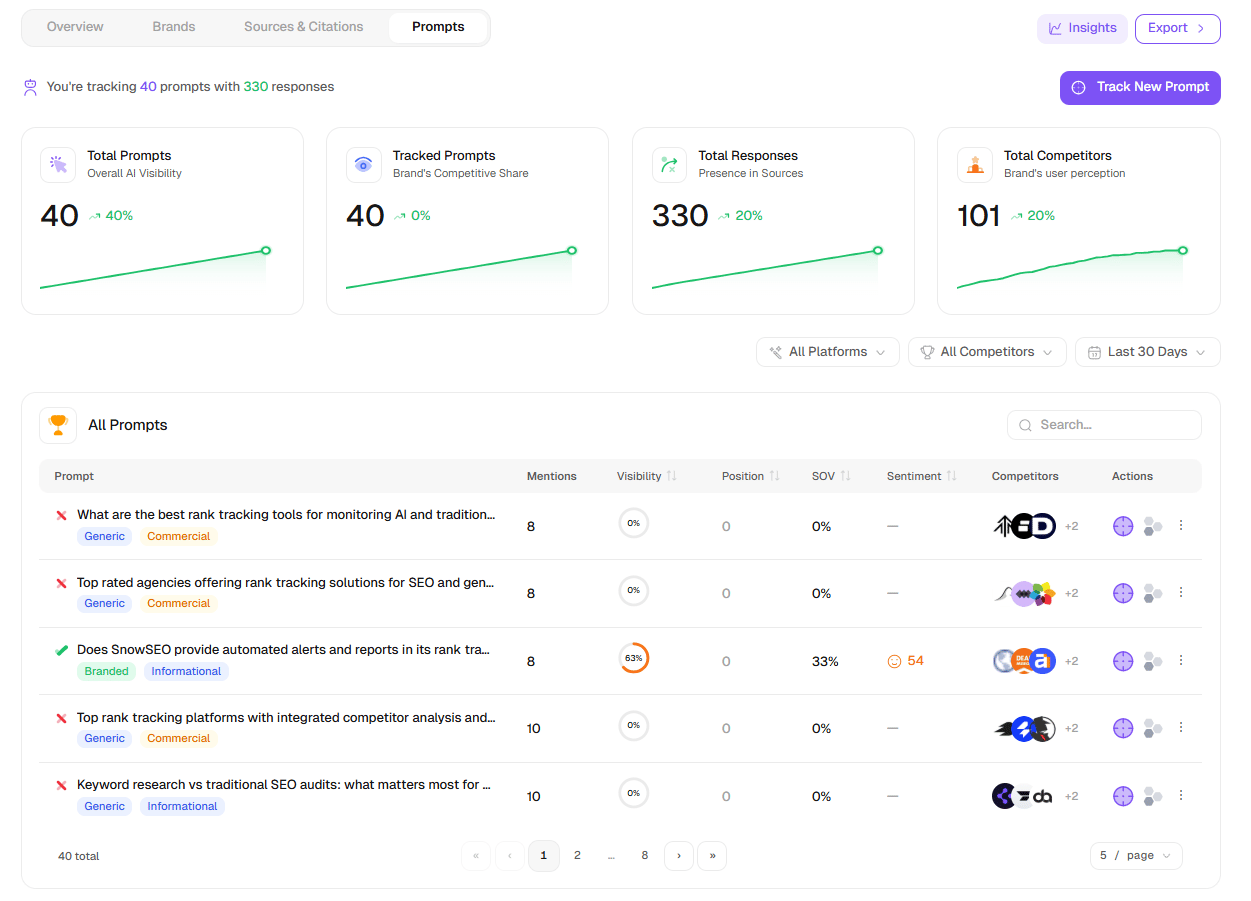
The Prompts tab is where you manage all your tracked search queries. Each prompt represents a specific question or search phrase that SnowSEO runs against AI platforms to measure your brand’s visibility.
“You’re tracking X prompts with Y responses” — your current tracking scope
Date filter — scope the data to a time window
Add Prompts button — opens a dropdown with two options:
Single prompt — Opens the Track New Prompt dialog where you enter one query, select a region, and toggle auto-tracking
Bulk import — Opens a dialog with a textarea where you can paste multiple prompts (one per line). SnowSEO detects the count and lets you set a region and toggle auto-tracking before importing
Every prompt you’ve created appears in this table, with powerful filtering:Search box — Filter prompts by text
Type filter — Scope to All, Branded, or Unbranded prompts (the Type group inside the global Filter dropdown)
Intent filter — All / Informational / Navigational / Transactional / Commercial (in the Filter dropdown)
Column
What it tells you
Select
Checkbox for bulk actions
Prompt
The query text with status indicators (checkmark = mentioned, cross = not mentioned), plus status badges (Processing, Failed), type badges (Branded, Unbranded), intent badges, and next-run countdown
Mentions
How many times your brand appeared in responses for this prompt
Visibility
A circular progress gauge (0–100%)
Position
Your brand’s average rank (#)
SOV
Share of Voice percentage
Sentiment
Icon + score (smile / neutral / sad, color-coded)
Competitors
Avatar stack showing top 3 competitors (+N more)
Actions
Track/Stop (target icon), Add to Topic/Remove from Topic (cluster icon), row menu (⋮): Track toggle, Pin/Unpin, Remove
Row actions menu (⋮):
Track / Stop tracking — Enable or disable the prompt’s automated refresh
Pin / Unpin — Pin important prompts to the top of the list
Remove — Delete the prompt and all its response data (with confirmation)
Bulk actions (select multiple rows):
Track / Untrack selected — Enable or disable in bulk
Add to Cluster — Connect selected prompts to a topic cluster
Delete selected — Remove with confirmation
Sorting: Click any column header to sort. Pinned prompts always appear first, then processing prompts, then by date.Click any prompt row to navigate to its Prompt Detail page.
Start with 10–15 prompts covering your main product categories and buyer questions. The system will automatically surface related opportunities as it processes responses.
Filter your prompts by Type and review Unbranded prompts separately from Branded ones. Unbranded prompts show where you win or lose purely on content merit — without your brand name biasing the AI. A low visibility score on unbranded prompts signals a content authority gap that needs attention.
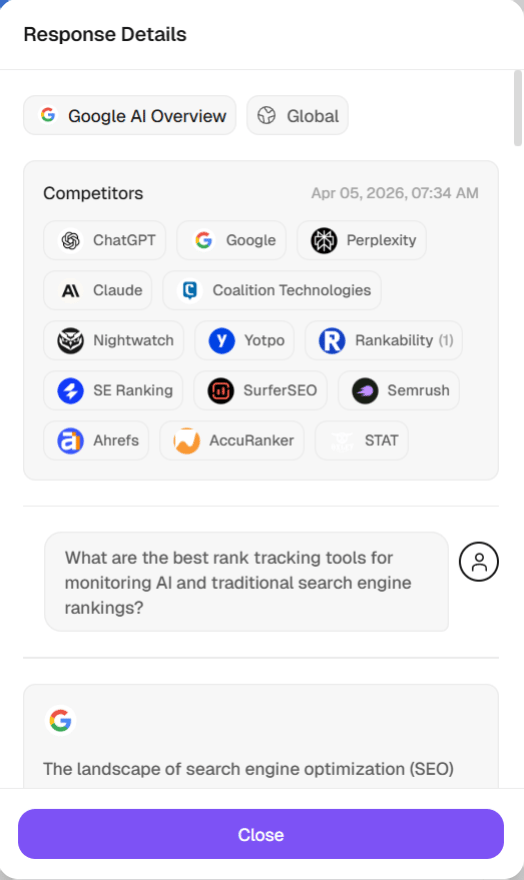
Clicking any prompt in the Prompts table takes you to the Prompt Detail page at /dashboard/ai-visibility/prompt/[id]. This page shows everything SnowSEO knows about a single search query.
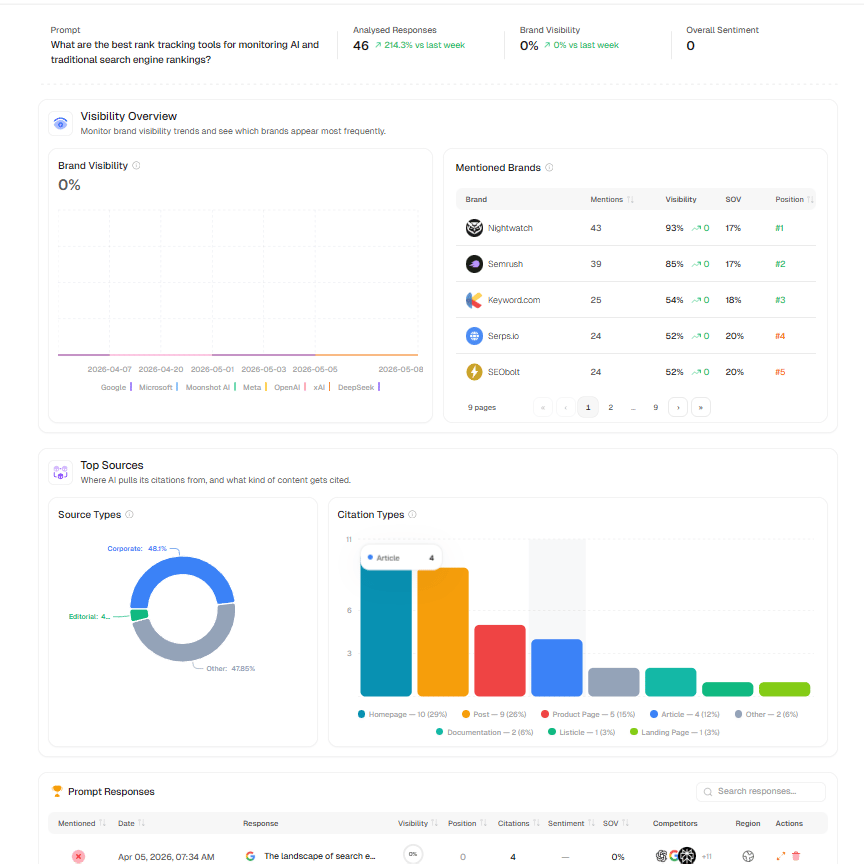
A line chart showing brand visibility over time for this prompt, broken down by AI platform. Below the chart, a Mentioned Brands table lists every brand detected with their Mentions, Visibility %, SOV, and Position.
AI models prefer citing pages that make clear, specific, and factual statements. Instead of vague claims like “Our product is great for businesses,” write “Our product reduces onboarding time by 40% for teams under 50 people.” Use clear headings, bullet points, and data — content that’s easy for both humans and AI to parse.
Add structured data (Schema markup) to your pages
Schema markup is code you add to your pages that tells AI crawlers exactly what type of content they’re reading — an Article, FAQ, Product, or Organization. Pages with proper schema are indexed more accurately and prioritized as authoritative sources. Key schema types to add: Article, FAQPage, HowTo, and Organization.
Make your brand consistent everywhere online
AI models build a picture of your brand from many sources — your website, LinkedIn, Crunchbase, Wikipedia, press mentions, and reviews. If your company name, description, or contact info is inconsistent across these, AI models may not trust you as a reliable “entity.” Audit your online presence and ensure all profiles are accurate and consistent.
Don't accidentally block AI bots from your site
Some sites unknowingly block AI crawlers in their robots.txt file, which prevents those AI tools from ever reading your content.Make sure these bots are allowed:
You can check your current robots.txt by visiting yourdomain.com/robots.txt.
Publish original data, research, and statistics
AI models disproportionately cite pages with specific numbers, statistics, and data — they prefer verifiable facts over opinions or generic claims. A single unique data point (e.g., “67% of SaaS companies increased AI visibility in Q1 2025”) can get cited across dozens of AI responses. Run original surveys, analyze your internal data, or commission industry research. Each unique statistic is a citation magnet.
Build comprehensive topic clusters, not isolated pages
AI models favor depth over breadth. Instead of publishing one-off blog posts on loosely related topics, create topic clusters — a pillar page that covers a subject comprehensively, supported by detailed sub-pages that each dive into a specific angle. When AI evaluates your site as a source, a tightly interlinked cluster signals authority on that topic much more effectively than scattered standalone articles.
We track your brand visibility across ChatGPT, Claude, Google Gemini, Grok, Perplexity, DeepSeek, and Meta Llama — all the major AI platforms where users now search for information and recommendations. You can enable or disable specific platforms in Settings → Automation Settings → AI Visibility.
How are prompts processed?
Each tracked prompt is sent to every enabled AI platform. The raw response is analyzed using SnowSEO’s brand extraction engine, which identifies all mentioned brands, their position in the response, the sentiment around each mention, and any cited sources. This data is then aggregated into visibility scores, share of voice, and citation metrics.
How often are prompts refreshed?
Prompts refresh automatically based on your plan’s configuration (default every 15 days). You can also manually refresh any prompt at any time from the Prompts tab. A cron worker checks daily for prompts that are due for refresh and queues them automatically.
I rank #1 on Google but have zero AI citations — is that normal?
Yes, and it’s increasingly common. Traditional search ranking and AI citation are different systems. Google’s algorithm ranks your page based on links, relevance, and authority. AI systems rank content based on how clearly and factually it answers questions. A page optimized for keywords may not be structured the way AI prefers. See the “How to Get Cited More” section above.
Can I see which specific AI tools are citing me?
Yes. The Competitors tab (Distribution Overview) and Citations tab show citation rates per platform, so you can see if you’re cited in ChatGPT but missing from Perplexity, for example. This helps you understand where to focus your GEO (Generative Engine Optimization) efforts.
How is brand sentiment measured?
When an AI tool cites your brand, SnowSEO captures the surrounding context and classifies it as positive, neutral, or negative. The sentiment score ranges from 0 (very negative) to 100 (very positive), with 50 being neutral. This is determined by the brand extraction AI model that analyzes each response.
What does the visibility score actually mean?
Visibility (0–100) is a composite metric that considers how often your brand appears in AI responses, how prominently it’s positioned (rank), how frequently it’s cited with sources, and the sentiment of mentions. A score of 80+ means your brand is consistently appearing early and positively in AI responses.
How many prompts should I track?
Start with 10–15 prompts covering your main topics and buyer questions. As you get comfortable, expand to 30–50 prompts for comprehensive coverage. There’s no hard limit, but each prompt consumes AI credits on each refresh cycle.
How do AI credits work for prompt tracking?
Each prompt refresh costs 15 AI credits per active platform. So if you have 4 platforms enabled and 20 prompts, a full refresh costs 20 × 4 × 15 = 1,200 credits. Credits are deducted from your Autumn billing balance. When credits run low, refresh jobs are skipped until more credits are available.
Can I export AI Visibility data?
Yes. Use the Export button (available in the Prompts tab and Prompt Detail page) to download a CSV with columns: Prompt, Platform, Provider, Company, AI Response, Brand Mentions, Brand Position, Total Mentions, Sources, Brands, Sentiment, Citations, and Date.
How is Share of Voice calculated?
Share of Voice is calculated per prompt using calculateSOVPerPrompt() from SnowSEO’s shared utils. It measures your brand’s visibility share relative to all competitors detected in that prompt’s responses. The aggregate SOV averages this across all your tracked prompts.