

Settings Sidebar Overview
The settings drawer is organized into three groups:
A brand switcher at the top of the sidebar lets you switch between brands — all Brand Book and Automation settings are per brand.
What’s an Organization vs a Brand?
If you manage multiple websites, create one brand per site. Each brand has its own data — completely isolated from the others.
Organization & Users
Open Settings → Organization Settings → Organization & Users. This panel has three tabs depending on your role:- Organization
- All Brands
- Users
Owner only. Manage your organization’s details:
- Organization Name — Your company’s display name
- Organization Slug — The unique URL-friendly identifier
Inviting Team Members
1
Go to Settings → Organization & Users
Open the user menu at the bottom-left, click Settings, then Organization & Users.
2
Pick a brand and click Invite
Select the All Brands tab, find the brand you want to add someone to, and click the Invite button.
3
Enter their email
Type their email address. They’ll get an email with a join link.
4
Choose their role
Pick what level of access they get:
- Member — Can view data, create content, run analytics. Cannot change settings or invite others.
- Admin — Can manage settings, invite members, and edit everything. Cannot handle billing.
- Owner — Full control. Can delete brands, change billing, manage everything.
5
They accept
They click the link in their email, sign in (or create a free account), and they’re in.
There are no seat limits on any plan — invite as many team members as you need, at no extra cost.
Brand Book
Your Brand Book tells SnowSEO who you are, what you do, and who you’re trying to reach — so every keyword suggestion, audit, and AI-generated article is tailored to your business. Open it from Settings → Brand Book.- About
- Audience
- Competitors
- Online Presence
- Knowledge Base
Define your brand’s core identity. Every field in this tab helps SnowSEO understand, represent, and track your brand across all features.
Brand Name
What your audience calls you — it doesn’t have to match your domain. This name is used throughout the platform for reports, AI content generation, and branded prompt classification in AI Visibility tracking. When SnowSEO scans AI responses for mentions of your brand, the brand name is matched as a whole word or phrase boundary — not as a substring of another company name.For example, if your brand name is “SnowSEO”, the platform will detect it as a mention when AI responses reference “SnowSEO” as a distinct word, but not when they mention “SnowSEOPlatform” (a different entity).Brand Logo
Upload a logo image (min 400×400px, PNG or JPEG). The logo appears in reports, branded assets, and featured images. When you upload a logo, SnowSEO automatically extracts brand colors from it — you can see these in the Brand Colors section below and fine-tune them manually.Brand Website
Your primary domain that SnowSEO uses for all analysis, including:- Website audits and crawling
- Rank tracking and keyword position monitoring
- Google Search Console traffic data
- AI visibility brand mention detection (cited URLs matching your domain)
Brand Feed Slug
Your public article feed URL, for example/feed/snowseo-com. This creates a shareable feed of your published articles, and automatically powers a standards-compliant RSS feed at /feed/{your-feed-slug}/rss.xml. Only lowercase letters, numbers, and hyphens are allowed. Once set, you can copy the feed URL or visit it directly.Brand Colors
SnowSEO can auto-detect brand colors from your logo or website favicon, or you can set them manually. Six color slots are available:These colors are used as the palette for AI-generated featured images in your articles. You can set each color with a hex color picker, or clear individual colors. If you upload a logo or favicon, SnowSEO attempts to extract these colors automatically.
Brand Aliases
Aliases are alternative names that represent your brand. They play a critical role in AI Visibility tracking — SnowSEO uses them to detect when AI responses mention your brand even when they use a variation of your official name.There are two types of aliases, and they behave differently:1. Domain-shaped aliases (contain a., like snowseo.io or app.snowseo.com)These are treated as extra hostnames/domains for your brand. SnowSEO uses them to match citation URLs and domain references in AI responses. For example, if your primary website is snowseo.com but you also own snowseo.io, adding it as an alias ensures citations to snowseo.io are counted as your brand.2. Text aliases (no ., like “Snow”, “Snow Platform”, “The SEO platform”)These are treated as alternate brand name spellings. SnowSEO matches them as whole words only (not substrings). For example:- If you add “Snow” as an alias, AI text mentioning “Snow” will count as a brand mention — but “Snowfall” or “Snowboard” will not.
- If you add “Snow Platform”, it must appear as a distinct phrase.
This classification lets you filter your AI Visibility dashboard to see how often AI models mention your brand in unbranded contexts — a stronger signal of organic brand awareness. Adding aliases improves detection by catching variations. For example, if “Snow” is an alias, a prompt like “How does Snow compare to Ahrefs?” becomes classified as branded, giving you more accurate visibility data.
Brand Description
A short summary (2–3 sentences) of what your brand does. This is used in several ways:- Helps AI generate more relevant content suggestions
- Provides context for AI-powered competitor suggestions
- Improves the accuracy of brand detection in AI responses
- Used as context when SnowSEO crawls your website for analysis
Website Screenshots
Add multiple labeled screenshots of your website. These images are used inside AI-generated articles to provide visual context. The screenshot carousel supports:- Upload — Choose a PNG or JPEG file from your computer
- Capture — SnowSEO can automatically capture a screenshot of your website (available for the homepage entry)
- Labels — Each screenshot has a label (e.g., “homepage”, “pricing”, “about”) for organization
- Navigation — Use the arrow buttons to browse through your screenshots
- Editing — Rename labels or replace images inline
- Deletion — Remove individual screenshots as needed
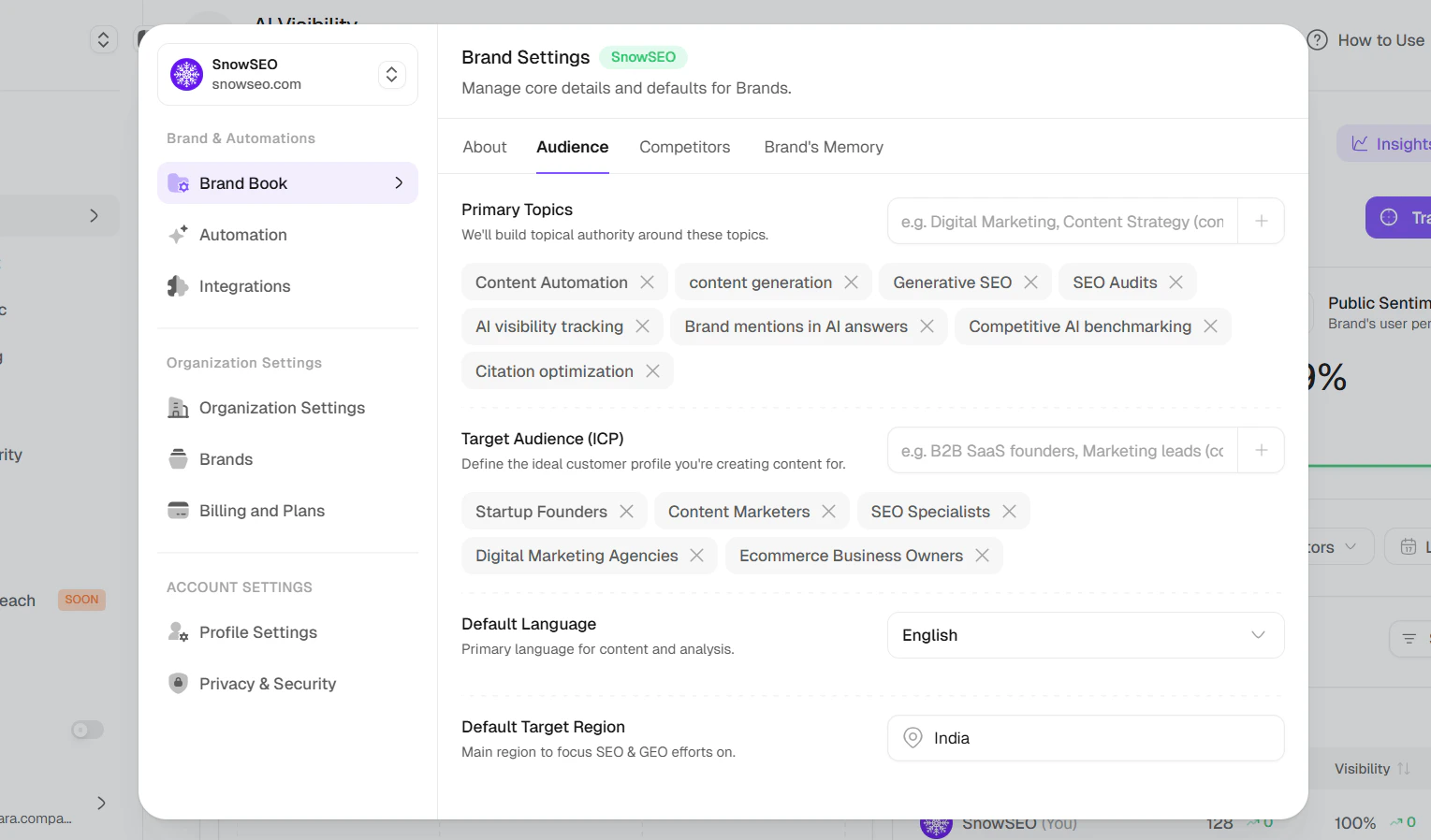
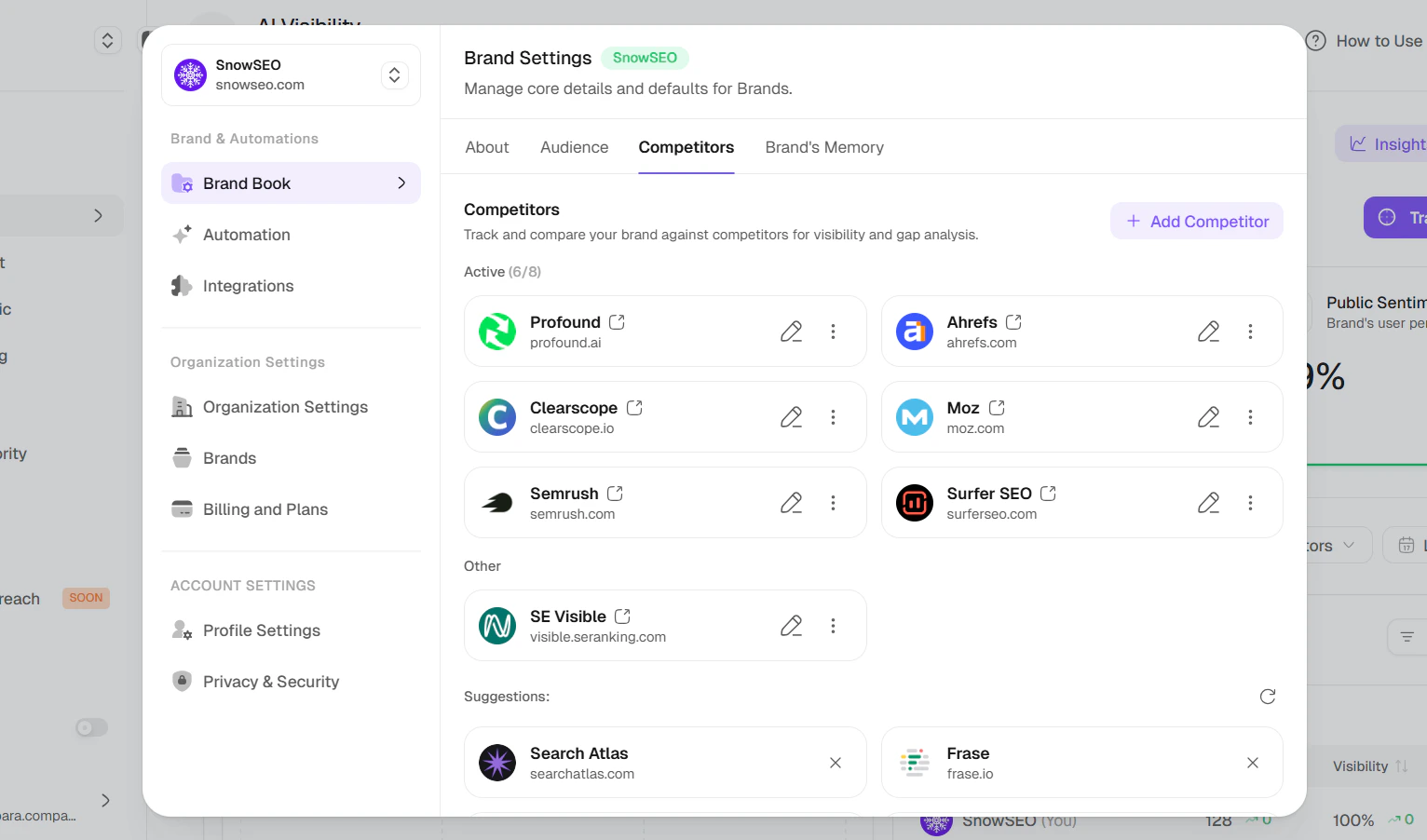
Brand Book settings are per brand. If you manage multiple brands, each one has its own settings.
Creating a New Brand
To add another website, click your current brand name at the top of the sidebar and select Create a brand (or go through onboarding). The flow is the same as onboarding:1
Enter your brand domain
Type your domain without
https:// — for example, acme.com.2
Choose your target region
Select the country where most of your audience is.
3
Choose your Competitors
SnowSEO suggests competitors automatically. Adjust them if needed.
4
View your stats
You’ll land on your AI Visibility and GEO Audit reports for the new brand.
Account Settings
Open Settings → Account Settings to manage your personal profile.Profile Settings
Manage your personal account details:- Profile Photo — Upload or change your avatar (min 400×400px, PNG or JPEG). Remove it with the indicator button.
- Username — Your display name visible to your team contacts.
- Email Address — Change your email. A verification link is sent to confirm.
Delete Account
Permanently delete your account and all associated data. This action is irreversible.Privacy & Security
This section is split into three sub-tabs:- Password & 2FA — Update your account password. Two-factor authentication (2FA) and backup codes are surfaced here but are coming soon.
- Active Sessions — View and revoke active login sessions across devices.
- Privacy & Data — Manage your privacy preferences and request a data export.
Frequently Asked Questions
Can I give someone access to only one brand, not all of them?
Can I give someone access to only one brand, not all of them?
Yes. When you invite someone, you choose which brand(s) they can see. They won’t see brands they haven’t been added to. This is useful for agencies — each client’s data stays private to that client’s team.
Do all team members need to connect their own Google accounts?
Do all team members need to connect their own Google accounts?
No. Once the Google Search Console and Google Analytics integrations are connected (by the owner or admin), everyone on the team can see the data. Each person doesn’t need their own Google permissions.
How do I switch between brands?
How do I switch between brands?
In the sidebar on the left, click the brand name at the top. A dropdown shows all your brands — click the one you want to switch to. You can also use the brand switcher inside Settings.
Can I change a brand's domain after creating it?
Can I change a brand's domain after creating it?
Yes — but only once every 30 days. Changing the domain resets your brand data (articles, keywords, audits, integrations, competitors) and redirects you to onboarding to set up the new website. Your organization and team members are preserved.
How do I stop getting email notifications?
How do I stop getting email notifications?
Notification preferences are managed per brand. Look for your notification settings within the dashboard or check your email preferences in your account settings. Specific notification channels (weekly reports, monthly audits, new opportunities, resource warnings) can be toggled on or off.
I changed my target audience in Brand Book — do I need to re-run anything?
I changed my target audience in Brand Book — do I need to re-run anything?
No, but future keyword suggestions and AI content will be tailored to your new audience profile. Existing content isn’t affected.
What are brand colors used for?
What are brand colors used for?
Brand colors (Vibrant, Muted, Dark Vibrant, Dark Muted, Light Vibrant, Light Muted) are used as the color palette for AI-generated featured images in your articles. You can set them manually in Brand Book → About, or let SnowSEO auto-detect them from your logo or website favicon.
What's the difference between branded and unbranded prompts in AI Visibility?
What's the difference between branded and unbranded prompts in AI Visibility?
A prompt is classified as branded if it contains your brand name or any of your brand aliases. It’s unbranded if it doesn’t. For example, “How does SnowSEO compare to Ahrefs?” is branded because it includes “SnowSEO”. “Best SEO tools for small businesses” is unbranded.The AI Visibility dashboard lets you filter by branded/unbranded to understand how often AI models mention your brand in contexts where the model wasn’t explicitly asked about you — this is a stronger signal of organic brand awareness.
How should I set up my brand aliases?
How should I set up my brand aliases?
Add names that people commonly use to refer to your brand. Aliases come in two types:
- Domain aliases (e.g.,
snowseo.ioif you own it) — these add extra hostnames that SnowSEO matches when scanning citation URLs in AI responses. - Text aliases (e.g., “Snow”, “Snow Platform”) — these are matched as whole words in AI response text. “Snow” will match the word “Snow” but not “Snowfall” or “Snowboard”.
Can brand aliases be domain names from other websites?
Can brand aliases be domain names from other websites?
Yes — if an alias contains a
. (like snowseo.io), SnowSEO treats it as an extra domain for your brand. This means citations to that domain in AI responses will be counted as your brand. Only add domains that you actually own or that legitimately represent your brand.