


SnowSEO pulls ranking data directly from Google Search Console (GSC) for accuracy. For brand-new keywords with no GSC history yet, we use our own live SERP trackers to fill in the gaps.
Keywords to Track
Whatever brand you enter into SnowSEO, the platform automatically tracks its performance and generates a comprehensive graph for ranked keywords in a highly visual format.Rank Tracking — Overview
This dashboard helps you monitor how your keywords are performing in search results over time. It immediately answers critical questions like:- Are my rankings improving or declining?
- How many keywords are moving up vs down?
- Am I gaining more top positions?
Top Section Controls
- Location Filter
- Time Range Selector
- Export & Insights
Tracks rankings based on your selected region (e.g., Worldwide, US, UK).
Your SERP Keywords (Main Graph)
The Keyword Tracking dashboard highlights which keywords are improving or declining in rankings, helping you identify growth opportunities, protect top positions, and optimize underperforming keywords. Key trend interpretation: If rising keywords are consistently higher than falling ones (with growth acceleration spikes), it provides the clear insight that your overall SEO performance is steadily improving.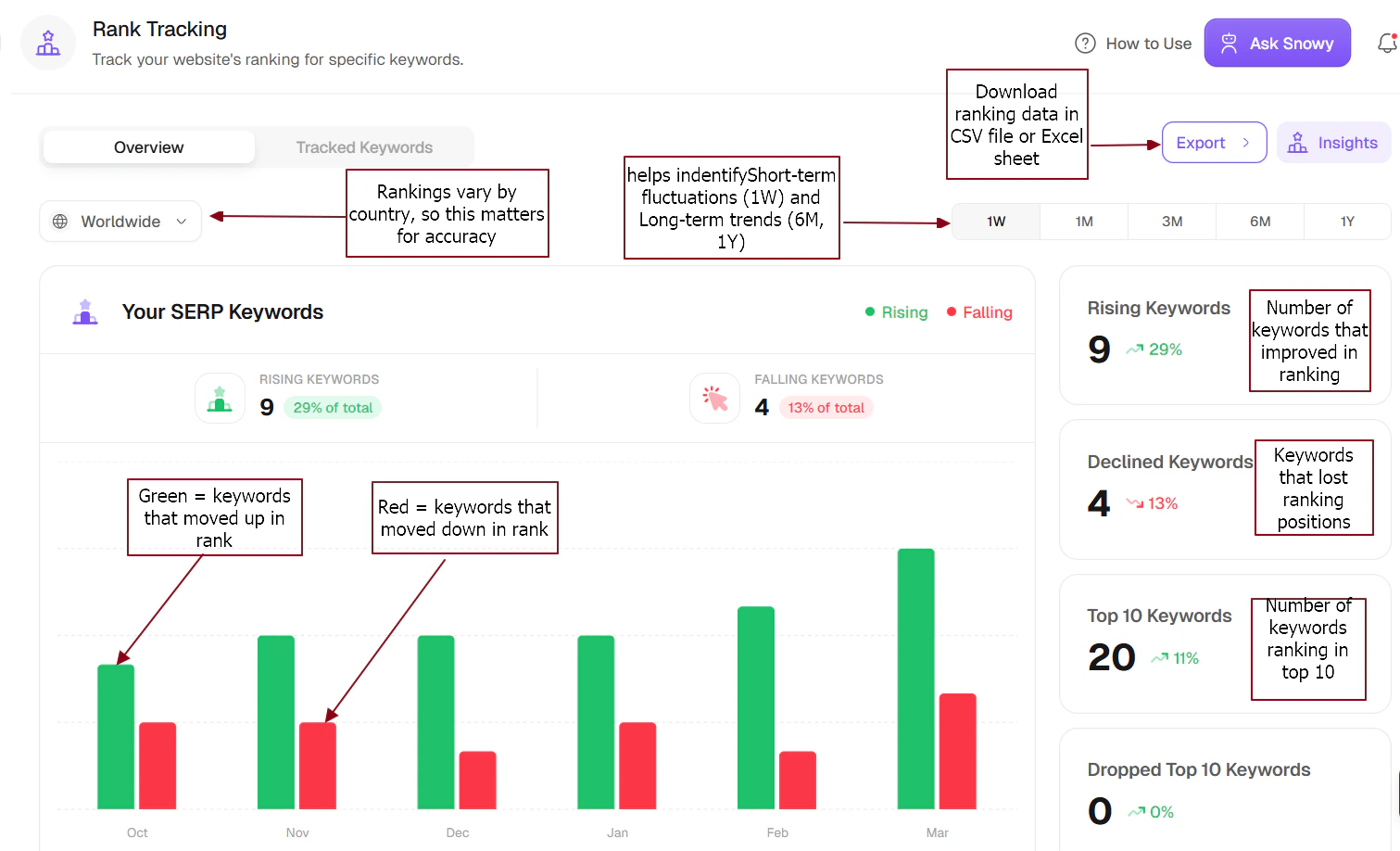
Right-Side Summary Cards
Rising Keywords
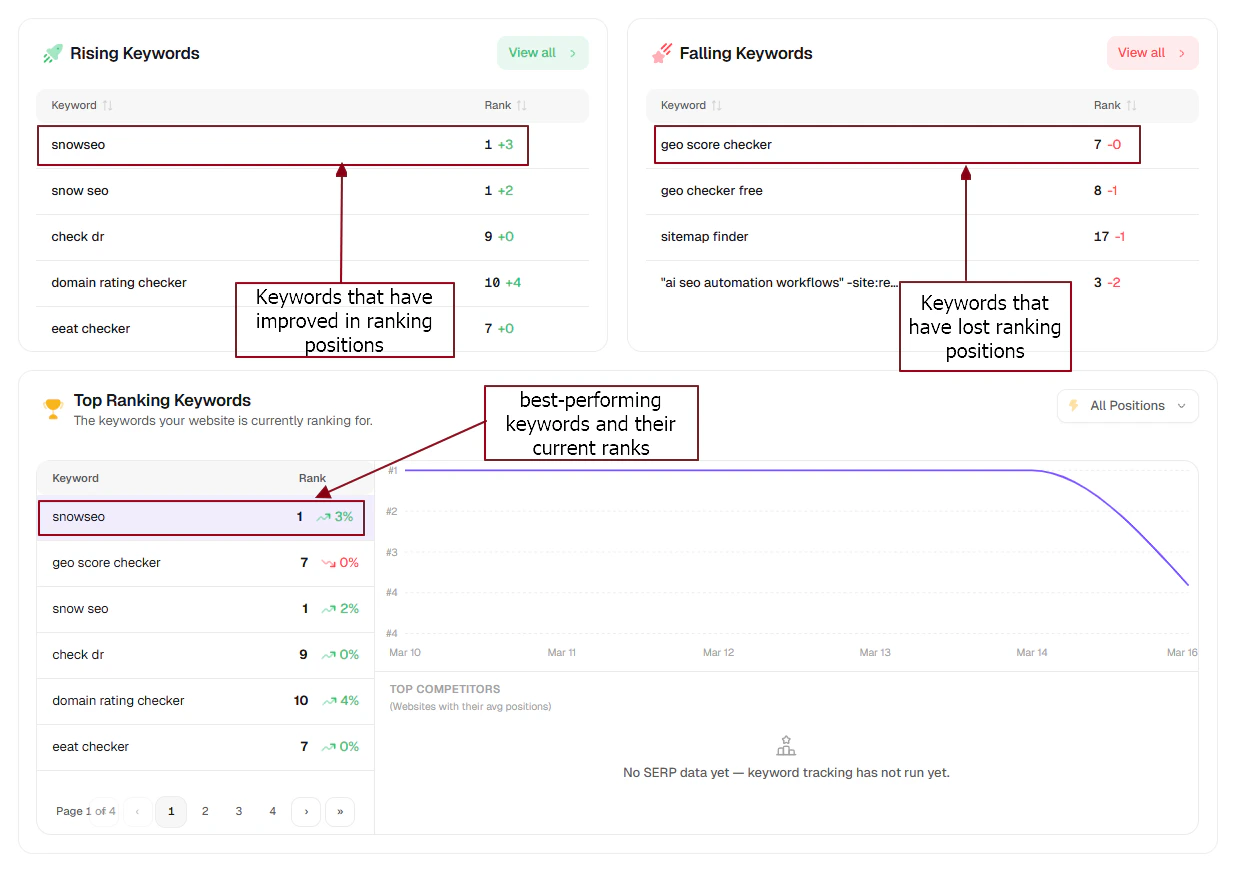
The number of keywords that improved in ranking (e.g., 9 keywords, +29% of total). This is a strong, positive indicator of SEO progress.
Falling Keywords
Keywords that lost ranking positions (e.g., 4 keywords, -13%). These should be actively monitored, investigated, and targeted for re-optimization.
Top 10 Keywords
The number of keywords ranking in the top 10 positions (Page 1 of Google). Critical metric: More Top 10 keywords equal exponentially more traffic potential.
Dropped Top 10 Keywords
Keywords that fell out of the top 10. Seeing 0 here is highly positive, meaning you’ve sustained your most valuable rankings.
How This Connects to Website Traffic
Your keyword movement directly correlates to your traffic outcomes. Here is what the data signals mean:- More rising keywords: Rising keywords are early indicators of future traffic growth — especially if they are approaching the top 10.
- Falling keywords: Top 10 keywords are the primary source of your website traffic — optimizing these yields the highest ROI.
- More Top 10 keywords: Exponentially higher Click-Through Rates (CTR).
What You Should Do Next
Double down on rising keywords
Identify exactly what is working, structure your internal links around these winners, and expand similar content to capture even more traffic.
Fix declining keywords
Actively update decaying content, improve backlink structures to those lagging pages, and check competitor moves to reclaim lost positions.
Reading the Dashboard
What Do the Columns Mean?
| Column | What it tells you |
|---|---|
| Current Position | Where you rank on Google right now |
| Change (Δ) | Movement since yesterday - ▲ means you climbed, ▼ means you dropped |
| Best Position | The highest you’ve ever ranked for this keyword - your benchmark |
| Volume | Estimated monthly searches for this keyword |
| URL | Which page on your site is currently ranking |
Using Filters to Find Quick Wins
Don’t try to monitor every keyword at once - use filters to surface the most actionable data:- Striking Distance (Positions 4–10)
- Page 2 Keywords (Positions 11–20)
- Declined Keywords
- By Tag
These are keywords where you’re already on page 1 of Google but not yet in the top 3. The top 3 positions get dramatically more clicks - bumping from position 7 to position 3 can triple your traffic for that keyword. These deserve your attention first.
Deep Dive: Keyword Detail View
Click any keyword row to open a detailed panel. This is where you diagnose why a ranking changed:Position History Chart
A day-by-day line chart of your ranking. Look for steady upward trends vs. sudden spikes or crashes. Gradual drops often signal content decay; sudden drops often signal an algorithm update or technical issue.
SERP Features
Shows special result types appearing for this keyword - Featured Snippets, Local Packs, People Also Ask boxes, Image Carousels. These can push regular results lower and reduce your click-through rate even if your position didn’t change.
Ranking URL History
Which of your pages has ranked for this keyword over time. If multiple pages appear, that’s keyword cannibalization - two of your pages competing against each other, causing both to rank poorly. Merge or consolidate them.
Competitor Snapshot
See which competitor domains jumped above or below you during a ranking shift - useful for understanding if a drop was caused by a competitor improvement rather than something you did wrong.
Frequently Asked Questions
My keyword dropped 5 positions overnight - should I be worried?
My keyword dropped 5 positions overnight - should I be worried?
Not immediately. Small fluctuations of 1–5 positions are completely normal. Google runs constant A/B tests on its results, causing daily “dances.” Only investigate if the drop persists for more than 5 days, affects many keywords at once, or coincides with a known Google algorithm update.
I see keywords I never added - where did they come from?
I see keywords I never added - where did they come from?
SnowSEO automatically surfaces keywords your site is already ranking for via Google Search Console. These are shown so you can discover organic opportunities you didn’t know about and choose to officially track them with one click.
A keyword shows 'N/A' for position - what does that mean?
A keyword shows 'N/A' for position - what does that mean?
It means your site either doesn’t rank in Google’s top 100 results for that keyword yet, or it’s a brand-new keyword with no GSC impressions recorded. Give it 48–72 hours. If it still shows N/A after that, consider whether you have any content targeting this keyword.
How often are rankings updated?
How often are rankings updated?
Rankings update daily. Data is pulled from Google Search Console as soon as Google makes it available for your account - typically by early morning each day for the previous day’s data.
Can I track keywords for a specific city or region?
Can I track keywords for a specific city or region?
Currently, SnowSEO supports rank tracking at the country level. Hyper-local tracking (city, zip code, or neighborhood level) is on our roadmap and coming in a future update.
What is keyword cannibalization and how do I fix it?
What is keyword cannibalization and how do I fix it?
Keyword cannibalization happens when two or more of your pages target the same keyword - they compete against each other, and Google struggles to decide which one to rank. The fix is to either merge them into one comprehensive page, or clearly differentiate the content so each page targets a distinct angle. The Ranking URL History in the keyword detail view will flag this for you.