> ## Documentation Index
> Fetch the complete documentation index at: https://snowseo.com/docs/llms.txt
> Use this file to discover all available pages before exploring further.
# Getting Started
> Everything you need to know to set up SnowSEO and start growing your organic search presence.
## What is SnowSEO?
SnowSEO is your **all-in-one SEO platform**. Instead of juggling five different tools for keyword research, rank tracking, content writing, and reporting, SnowSEO connects them all in one place - synced directly to your real Google data.
SnowSEO connects directly to **Google Search Console (GSC)**, which means the data you see isn't estimated - it's the exact ranking and click data Google uses for your site.
***
## How SnowSEO Works
Everything in the platform follows a simple three-step loop:
Connect your site and see exactly where you stand today - rankings, traffic, technical health, and more.
Use AI-powered research to find the keywords and content opportunities your competitors are missing.
Write, optimize, and publish content - then track your progress every day as rankings move.
***
## What's Inside SnowSEO
See exactly how your site is performing - without the complexity of raw analytics dashboards.
* **AI Visibility** - Track how often your brand appears in AI answers like ChatGPT and Google Gemini
* **Website Audit** - Automatically find technical issues blocking Google from crawling your site
* **Traffic** - Clicks, impressions, and CTR from Google in one clean graph
* **Rank Tracking** - Watch your target keywords climb (or drop) in Google rankings daily
Build a content strategy that positions you as an authority in your niche.
* **Topic Clusters** - Group related keywords into content themes to build topical authority and rank for entire topic areas
Go from planning to published content faster, with a whole team if needed.
* **Content** - An AI writing assistant that scores your content in real time as you write
* **Backlink Outreach** - Track link-building campaigns and monitor your earned backlinks
Free SEO tools to support your workflow.
* **SEO Tools** - Domain rating, backlink checking, page speed, GEO analysis, and more
Find out what your audience is actually searching for and build a plan to capture it.
* **Keyword Research** - Discover high-volume, low-competition keywords in your niche
* **Website Audit** - Automatically find technical issues blocking Google from crawling your site
* **Clusters** - Group related keywords into content themes to build topical authority
Go from planning to published content faster, with a whole team if needed.
* **Content** - An AI writing assistant that scores your content in real time as you write
* **Backlink Outreach** - Track link-building campaigns and monitor your earned backlinks
***
## Quick Setup: Get Your First Insights in Minutes
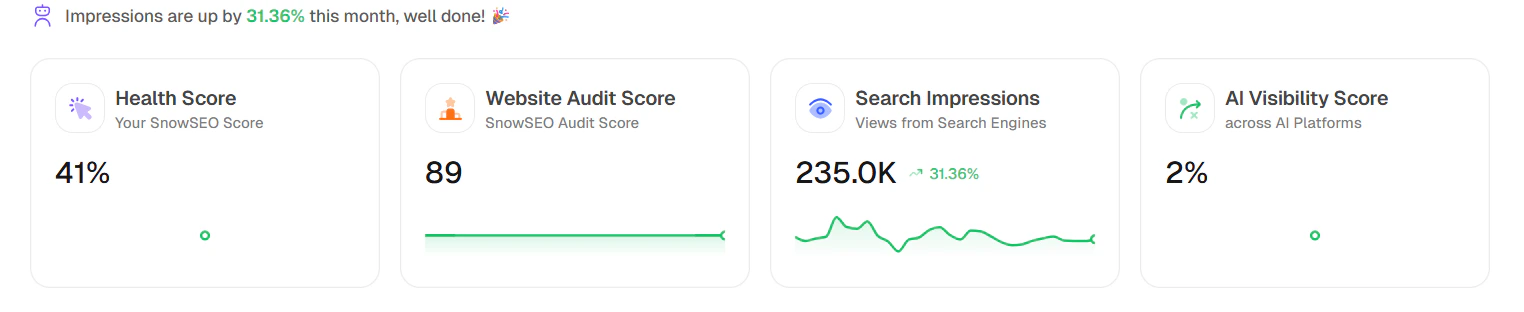
When you open the **Home** page, read it top-to-bottom in this order:
### 1. Keyword Performance Indicator(KPI) Cards
* **Health Score**: Your overall SnowSEO health indicator for the brand.
* **Website Audit Score**: Technical/site-quality score from your latest audit run.
* **Search Impressions**: Total search-engine visibility with month-over-month movement.
* **AI Visibility Score**: Your brand visibility level across tracked AI platforms.
This row gives you a 10-second health check before diving deeper.
 ### 2. Performance Summary
This section has two tabs that answer different questions:
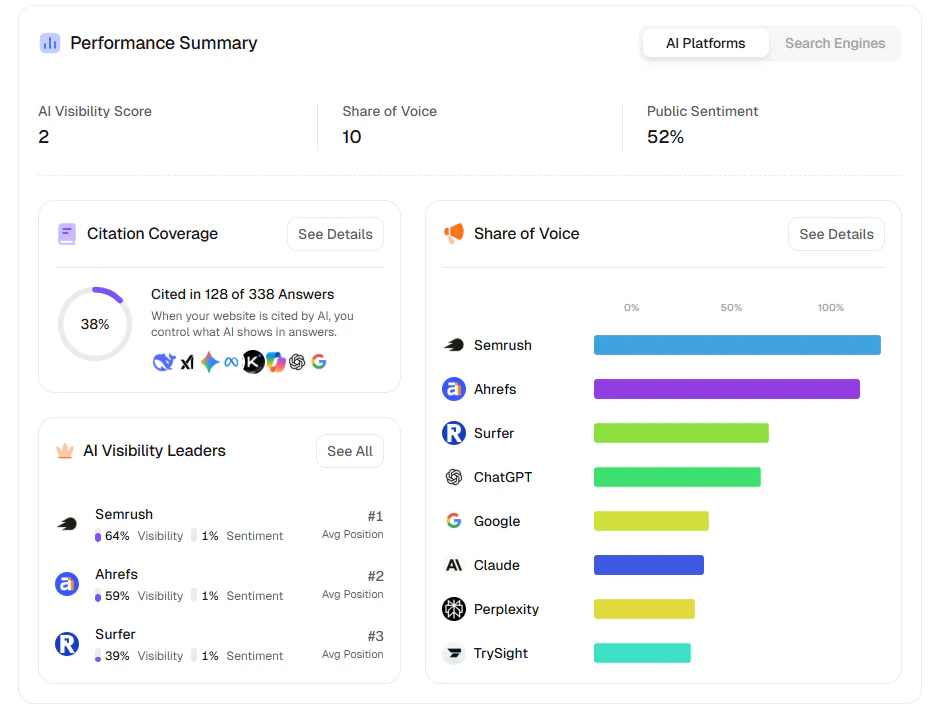
Use this tab to understand AI-discovery performance:
* **AI Visibility Score**: Overall strength of your brand in AI answers.
* **Share of Voice**: How much answer share you capture vs other brands/platforms.
* **Public Sentiment**: Positive/neutral/negative tone around mentions.
The detail cards help you act quickly:
* **Citation Coverage**: How often your site is cited in AI answers.
* **Share of Voice chart**: Relative contribution by platforms/players.
* **AI Visibility Leaders**: Leaderboard view of top competitors and positions.
### 2. Performance Summary
This section has two tabs that answer different questions:
Use this tab to understand AI-discovery performance:
* **AI Visibility Score**: Overall strength of your brand in AI answers.
* **Share of Voice**: How much answer share you capture vs other brands/platforms.
* **Public Sentiment**: Positive/neutral/negative tone around mentions.
The detail cards help you act quickly:
* **Citation Coverage**: How often your site is cited in AI answers.
* **Share of Voice chart**: Relative contribution by platforms/players.
* **AI Visibility Leaders**: Leaderboard view of top competitors and positions.
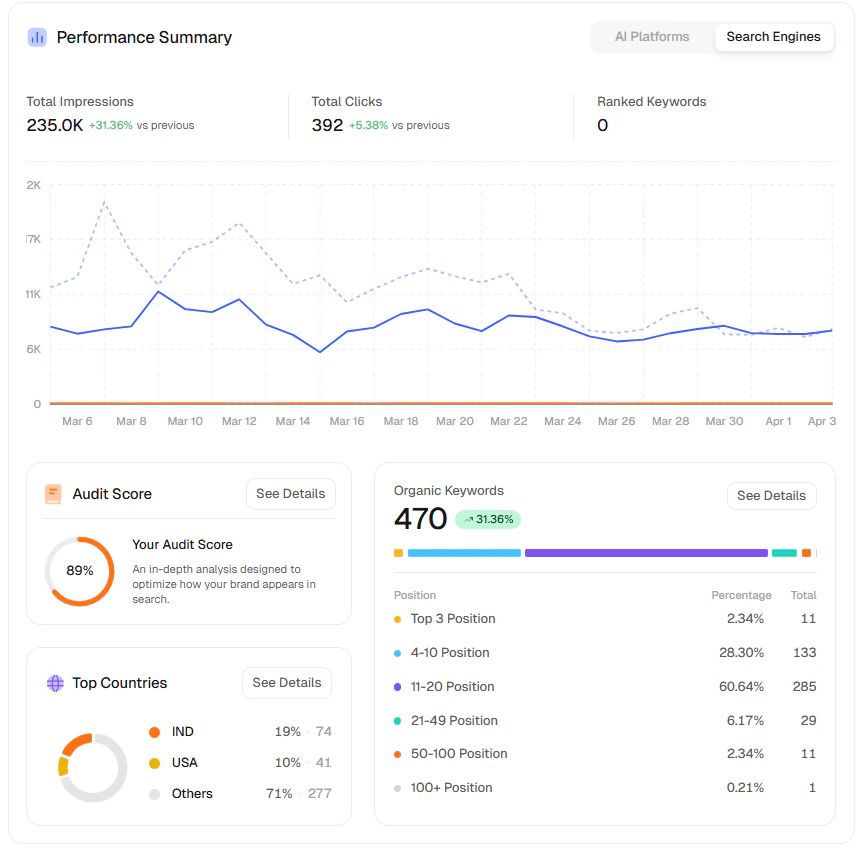
 Use this tab to track classic SEO momentum:
* **Total Impressions**: How often your pages appear in search results.
* **Total Clicks**: Traffic earned from those appearances.
* **Ranked Keywords**: Count of tracked keywords currently ranking.
The chart visualizes trends over time, and the lower cards add context:
* **Audit Score**: Technical health contribution to performance.
* **Organic Keywords** distribution: Position buckets (Top 3, 4-10, 11-20, etc.).
* **Top Countries**: Geography split of where visibility is coming from.
Use this tab to track classic SEO momentum:
* **Total Impressions**: How often your pages appear in search results.
* **Total Clicks**: Traffic earned from those appearances.
* **Ranked Keywords**: Count of tracked keywords currently ranking.
The chart visualizes trends over time, and the lower cards add context:
* **Audit Score**: Technical health contribution to performance.
* **Organic Keywords** distribution: Position buckets (Top 3, 4-10, 11-20, etc.).
* **Top Countries**: Geography split of where visibility is coming from.
 ### 3. Recent Activities
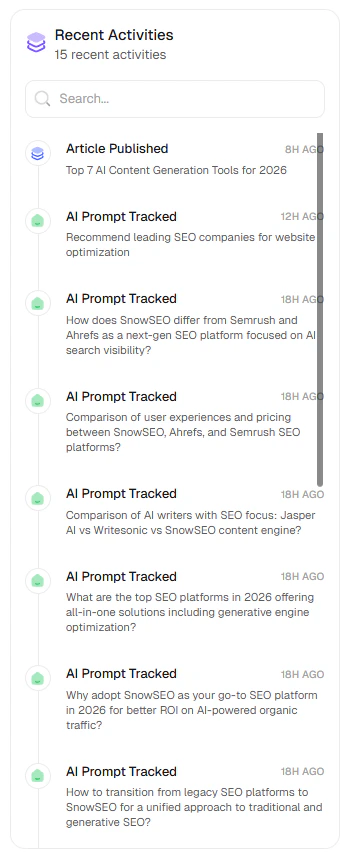
This timeline shows what just happened in your workspace, such as:
* Article published
* AI prompts tracked
* Recent tracking events by time
Use it to verify that your publishing and tracking pipelines are actively running.
### 3. Recent Activities
This timeline shows what just happened in your workspace, such as:
* Article published
* AI prompts tracked
* Recent tracking events by time
Use it to verify that your publishing and tracking pipelines are actively running.
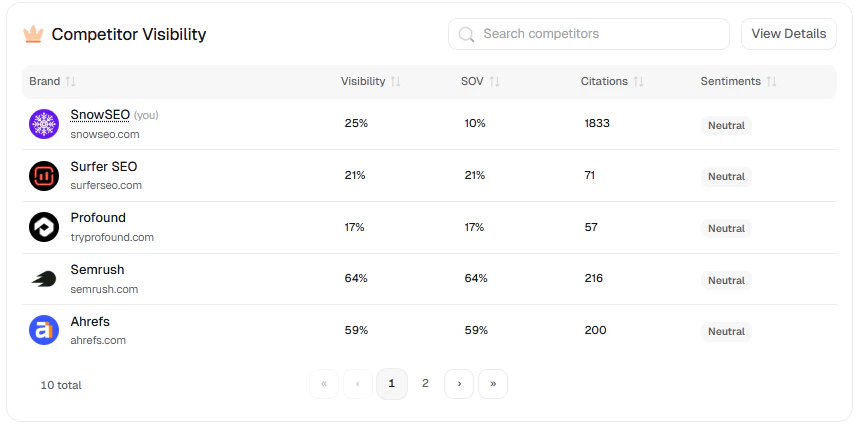
 ### 4. Competitor Visibility
This comparison table helps you benchmark your brand against competitors using:
* **Visibility**: How often each brand appears in tracked results overall.
* **SOV (Share of Voice)**: The percentage share of total visibility a brand owns vs competitors.
* **Citations**: How many times a brand is referenced/cited across tracked responses.
* **Sentiments**: Whether mentions are mostly positive, neutral, or negative.
Use search and pagination to audit where competitors are outperforming and where your brand leads.
### 4. Competitor Visibility
This comparison table helps you benchmark your brand against competitors using:
* **Visibility**: How often each brand appears in tracked results overall.
* **SOV (Share of Voice)**: The percentage share of total visibility a brand owns vs competitors.
* **Citations**: How many times a brand is referenced/cited across tracked responses.
* **Sentiments**: Whether mentions are mostly positive, neutral, or negative.
Use search and pagination to audit where competitors are outperforming and where your brand leads.
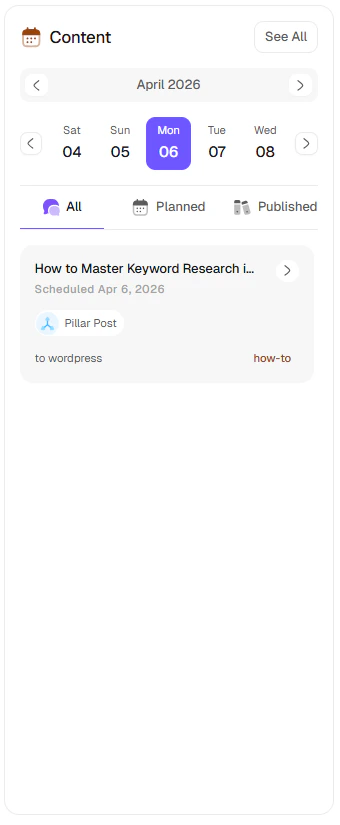
 ### 5. Content Panel
This is your schedule view for planned and published content:
* Calendar/date selector
* Status filters (`All`, `Planned`, `Published`)
* Content cards with publish destination and article type
Use this panel to keep execution aligned with your SEO/GEO goals.
### 5. Content Panel
This is your schedule view for planned and published content:
* Calendar/date selector
* Status filters (`All`, `Planned`, `Published`)
* Content cards with publish destination and article type
Use this panel to keep execution aligned with your SEO/GEO goals.
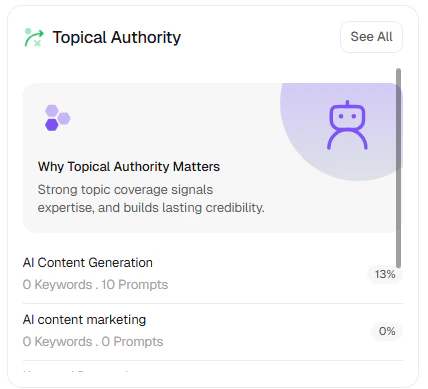
 ### 6. Topic Clusters
This widget shows topic-level coverage and progress:
* Topic list with keyword/prompt counts
* Progress/coverage percentages
* Quick educational context for why topical authority matters
Use it to identify thin topics and prioritize cluster expansion.
### 6. Topic Clusters
This widget shows topic-level coverage and progress:
* Topic list with keyword/prompt counts
* Progress/coverage percentages
* Quick educational context for why topical authority matters
Use it to identify thin topics and prioritize cluster expansion.
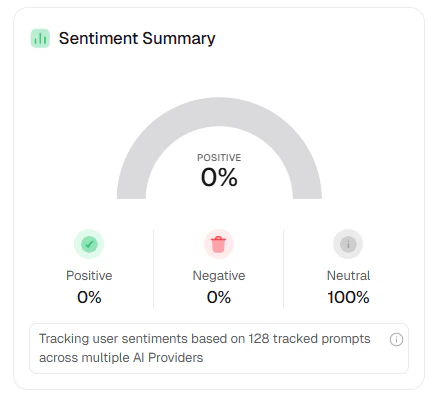
 ### 7. Sentiment Summary
This section aggregates tracked prompt sentiment across providers:
* **Positive**
* **Negative**
* **Neutral**
It gives a reputation pulse for your AI presence and highlights whether mentions are improving over time.
### 7. Sentiment Summary
This section aggregates tracked prompt sentiment across providers:
* **Positive**
* **Negative**
* **Neutral**
It gives a reputation pulse for your AI presence and highlights whether mentions are improving over time.
 ### 8. How to Use Home Weekly
1. Check top KPI cards and both **Performance Summary** tabs.
2. Review **Recent Activities** to confirm tracking/publishing events.
3. Compare **Competitor Visibility** and pick one gap to close.
4. Use **Content** + **Topic Clusters** to plan next execution.
5. Watch **Sentiment Summary** for reputation shifts.
***
## Get Help
Learn how to configure your Brand settings and connect your integrations correctly.
Learn what Clicks, Impressions, CTR, and Average Position actually mean for your business.
Start monitoring your rankings and find the fastest paths to page 1.
Access free tools for GEO analysis, domain rating, backlink checking, and more.
Invite team members and manage permissions across your brands.
Stuck on something? Email our team directly — we respond fast.
***
## Frequently Asked Questions
No. SnowSEO is designed to be usable whether you're a complete beginner or a seasoned SEO professional. Plain-language explanations are built into every feature, and the platform guides you through the most important setup steps. You don't need to know what a canonical tag is to get value.
You'll see data (rankings, traffic, audit results) immediately after connecting your site and Google Search Console. SEO results - meaning your rankings actually improving - typically take 2–4 months of consistent content and technical improvements. The platform is designed to help you find the fastest wins first.
The core integrations are **Google Search Console** (for ranking and traffic data) and **Google Analytics 4** (for session and conversion data). You can also connect your **CMS** (WordPress, Webflow, Ghost) to publish content directly. See the Brands guide for full integration setup.
Yes. Each website is managed as a separate **Brand** within your account. You can switch between brands from the sidebar. Each has its own keywords, audits, content pipeline, and integrations - completely separate.
As more users ask questions in ChatGPT, Perplexity, and Google's AI Overviews instead of clicking traditional search results, SnowSEO tracks how often your brand is cited in those AI-generated answers. You get a citation rate, sentiment score, and competitor comparison - plus guidance on how to improve your presence. See the AI Visibility guide for details.
Yes. SnowSEO only accesses the Google account data you explicitly authorize during setup (Search Console and Analytics). We don't share your data with third parties and you can revoke access at any time from your Brand Settings.
### 8. How to Use Home Weekly
1. Check top KPI cards and both **Performance Summary** tabs.
2. Review **Recent Activities** to confirm tracking/publishing events.
3. Compare **Competitor Visibility** and pick one gap to close.
4. Use **Content** + **Topic Clusters** to plan next execution.
5. Watch **Sentiment Summary** for reputation shifts.
***
## Get Help
Learn how to configure your Brand settings and connect your integrations correctly.
Learn what Clicks, Impressions, CTR, and Average Position actually mean for your business.
Start monitoring your rankings and find the fastest paths to page 1.
Access free tools for GEO analysis, domain rating, backlink checking, and more.
Invite team members and manage permissions across your brands.
Stuck on something? Email our team directly — we respond fast.
***
## Frequently Asked Questions
No. SnowSEO is designed to be usable whether you're a complete beginner or a seasoned SEO professional. Plain-language explanations are built into every feature, and the platform guides you through the most important setup steps. You don't need to know what a canonical tag is to get value.
You'll see data (rankings, traffic, audit results) immediately after connecting your site and Google Search Console. SEO results - meaning your rankings actually improving - typically take 2–4 months of consistent content and technical improvements. The platform is designed to help you find the fastest wins first.
The core integrations are **Google Search Console** (for ranking and traffic data) and **Google Analytics 4** (for session and conversion data). You can also connect your **CMS** (WordPress, Webflow, Ghost) to publish content directly. See the Brands guide for full integration setup.
Yes. Each website is managed as a separate **Brand** within your account. You can switch between brands from the sidebar. Each has its own keywords, audits, content pipeline, and integrations - completely separate.
As more users ask questions in ChatGPT, Perplexity, and Google's AI Overviews instead of clicking traditional search results, SnowSEO tracks how often your brand is cited in those AI-generated answers. You get a citation rate, sentiment score, and competitor comparison - plus guidance on how to improve your presence. See the AI Visibility guide for details.
Yes. SnowSEO only accesses the Google account data you explicitly authorize during setup (Search Console and Analytics). We don't share your data with third parties and you can revoke access at any time from your Brand Settings.