> ## Documentation Index
> Fetch the complete documentation index at: https://snowseo.com/docs/llms.txt
> Use this file to discover all available pages before exploring further.
# Website Audit
> Find and fix technical issues that are holding your site back in search results.
Even great content can't rank if your website has technical problems. The **Website Audit** tool automatically scans every page of your site - the same way Google does - and gives you a clear, prioritized list of what's broken and how to fix it.
Run your first audit right after setting up your project. It gives you a baseline to measure all future improvements against.
***
## Running Your First Audit
In the sidebar, go to **Analysis → On-Page SEO → Website Audit**.
SnowSEO starts from your homepage and follows every internal link across your site - just like Google's crawler does.
Most sites finish crawling in a few minutes. Once done, you'll see your **Site Health Score** and a full breakdown of issues, sorted from most to least impactful.
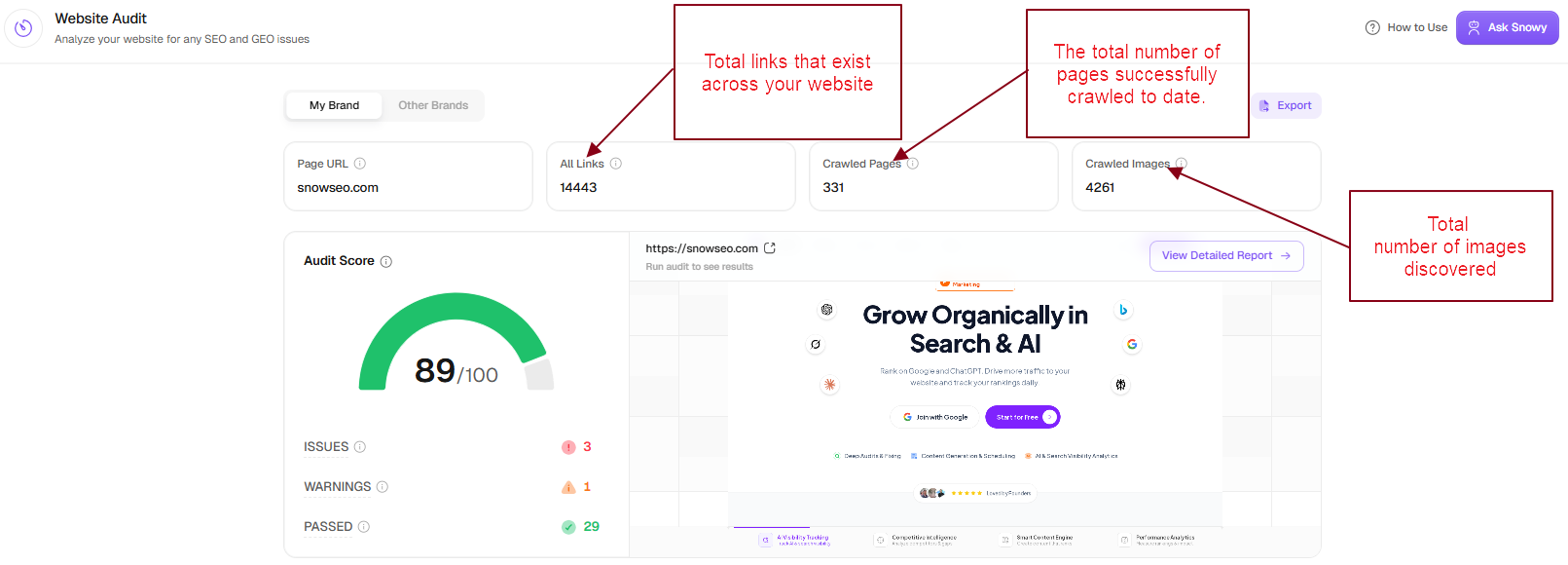 From the above image, Core Metric: **Audit Score (89/100)**
What it means: Overall health is very good, but not perfect → issues still exist.
The detailed audit view breaks down your website's performance into focused sections so you can prioritize fixes and improve rankings faster.
From the above image, Core Metric: **Audit Score (89/100)**
What it means: Overall health is very good, but not perfect → issues still exist.
The detailed audit view breaks down your website's performance into focused sections so you can prioritize fixes and improve rankings faster.
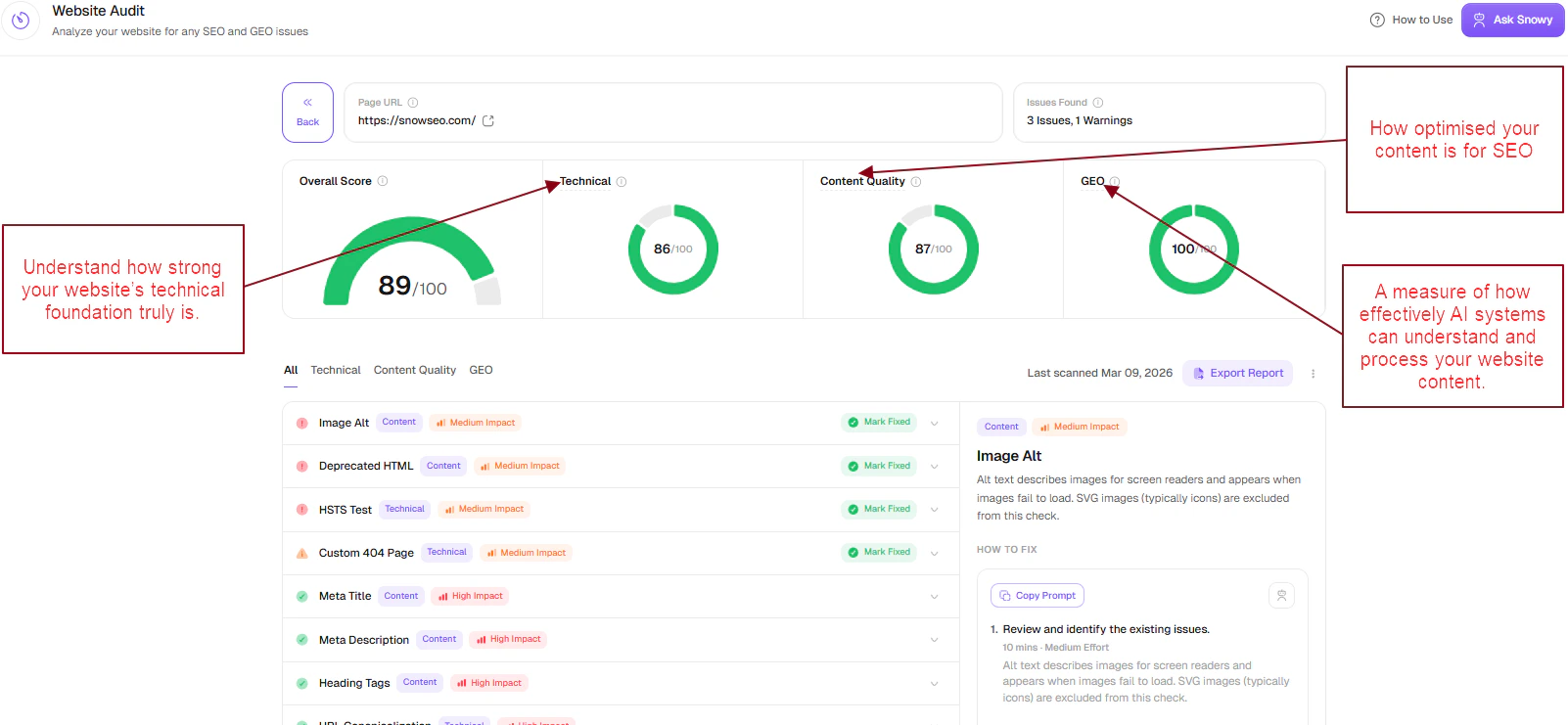 The **Technical** section evaluates the core infrastructure of your website, including crawlability, indexing, security (HTTPS), and overall site structure.
A higher score means search engines can reliably access, understand, and index your pages without obstacles.
Use this section to identify and resolve critical issues such as broken links, incorrect canonical tags, crawl restrictions, and URL errors that may impact visibility.
The **Technical** section evaluates the core infrastructure of your website, including crawlability, indexing, security (HTTPS), and overall site structure.
A higher score means search engines can reliably access, understand, and index your pages without obstacles.
Use this section to identify and resolve critical issues such as broken links, incorrect canonical tags, crawl restrictions, and URL errors that may impact visibility.
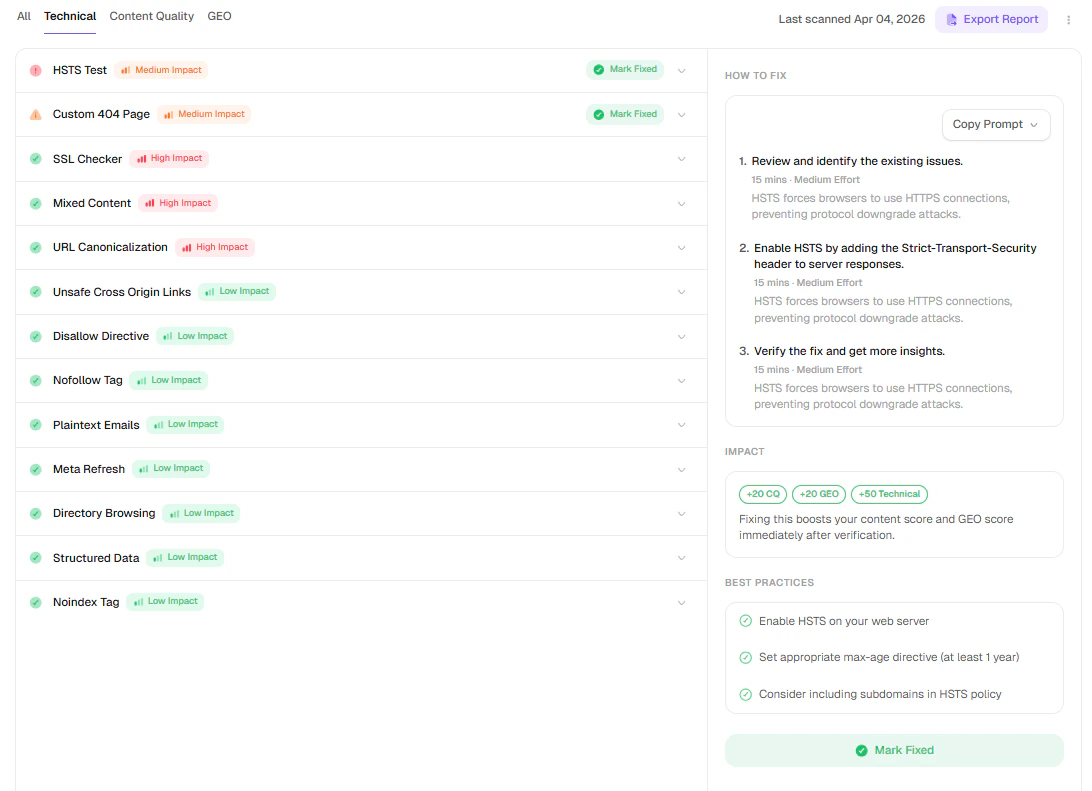 The **Content Quality** section focuses on how effectively your content is optimized for search engines and users.
It reviews key on-page elements such as titles, meta descriptions, headings, and image alt text to ensure clarity, relevance, and structure.
Use this section to improve how your content communicates its purpose and matches user search intent.
The **Content Quality** section focuses on how effectively your content is optimized for search engines and users.
It reviews key on-page elements such as titles, meta descriptions, headings, and image alt text to ensure clarity, relevance, and structure.
Use this section to improve how your content communicates its purpose and matches user search intent.
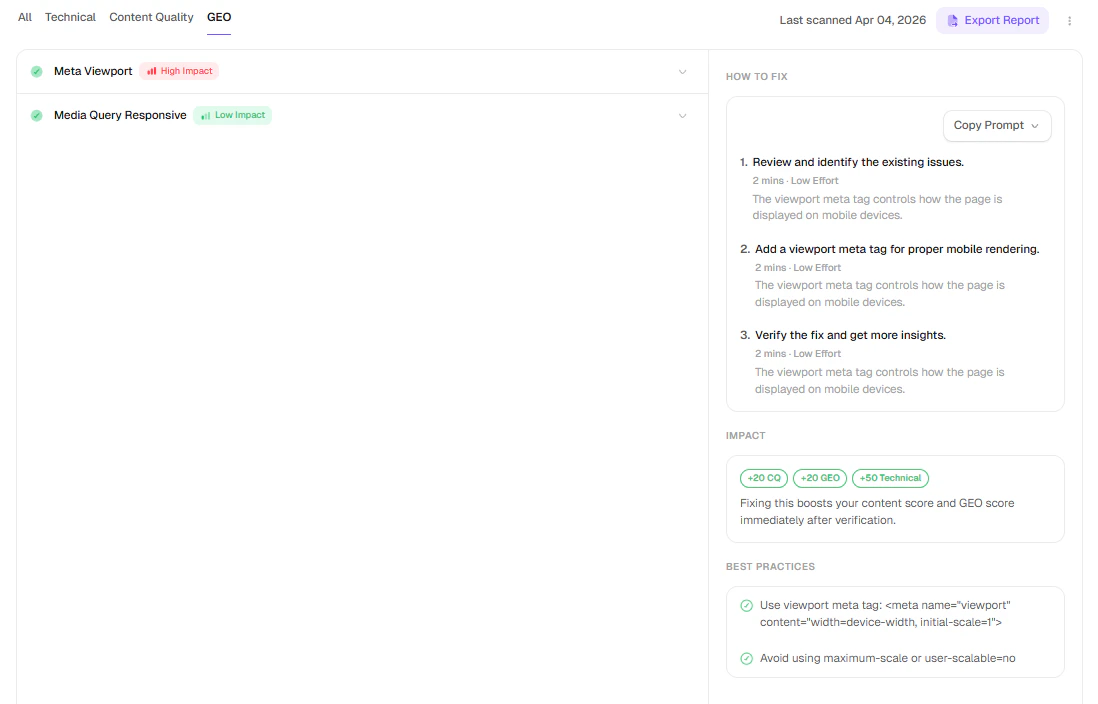
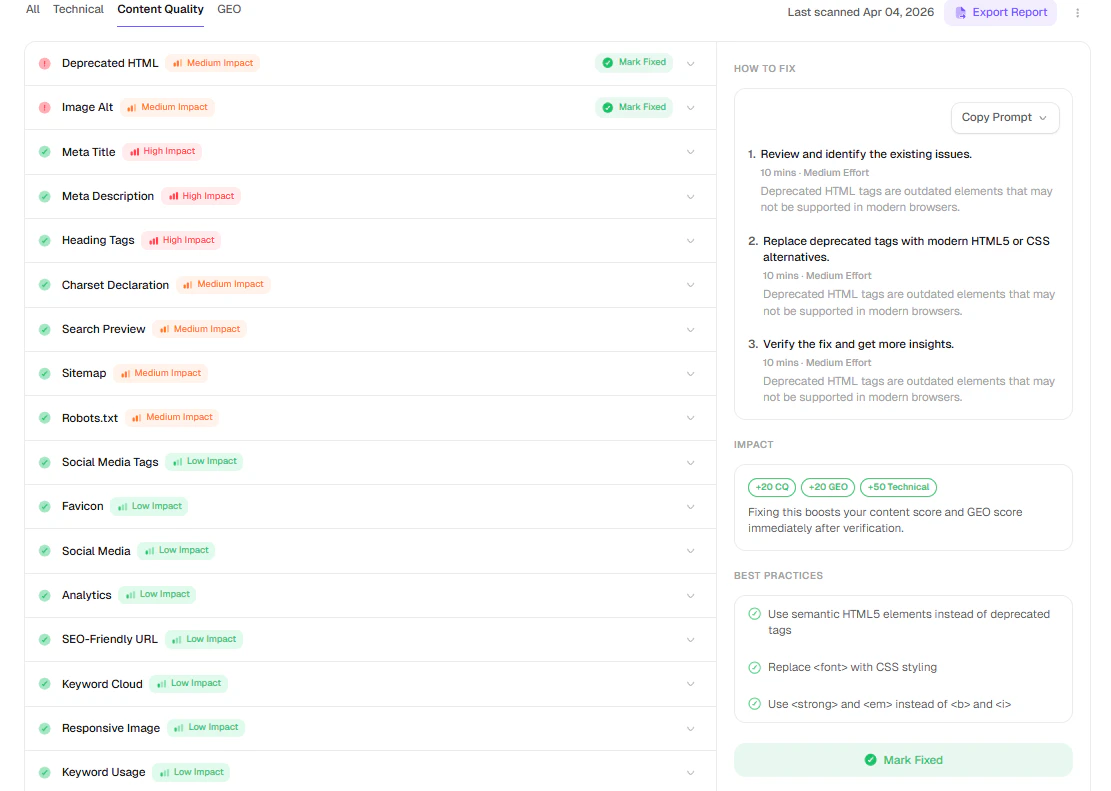 The **GEO** section assesses how well your content is structured for AI systems to interpret and process.
It highlights factors that influence how your content may be understood, summarized, and referenced in AI-driven experiences.
Use this section to enhance clarity and structure, making your content more accessible to modern search and AI platforms.
The **GEO** section assesses how well your content is structured for AI systems to interpret and process.
It highlights factors that influence how your content may be understood, summarized, and referenced in AI-driven experiences.
Use this section to enhance clarity and structure, making your content more accessible to modern search and AI platforms.
 For very large sites (500,000+ pages), consider scheduling audits during low-traffic hours like early morning. The crawler is respectful of server load by default, but it's good practice for large-scale sites.
***
## Understanding Your Site Health Score
Your **Site Health Score** is a number from 0 to 100. Think of it like a report card for your website's technical SEO health. The higher the number, the fewer issues Google will run into when crawling your site.
| Score | What it means | What you should do |
| --------------- | ------------------------------------------------- | -------------------------- |
| **90–100** ✅ | Excellent - your site is technically clean | Maintain and monitor |
| **70–89** 🟡 | Good - a few things need attention | Fix warnings when possible |
| **50–69** 🟠 | Needs work - some issues hurting your performance | Schedule a fix sprint |
| **Below 50** 🔴 | Critical - serious problems holding you back | Prioritize immediately |
***
## Types of Issues Found
These are serious problems that directly prevent Google from crawling or ranking your pages. Fix these before anything else.
Common errors you might see:
* **Broken internal links (404)** - A page on your site links to a URL that no longer exists. Visitors and search engines hit a dead end.
* **Server errors (5xx)** - Pages that crash when loaded. Google stops crawling these.
* **Important pages blocked by robots.txt** - Your SEO team's worst nightmare: a page that Google isn't allowed to read.
* **"noindex" on pages that should rank** - A tag that tells Google to ignore the page, sometimes added accidentally.
* **Redirect chains** - When clicking one URL bounces through 3+ redirects before landing. Wastes crawl budget and slows users down.
These issues slow down your search performance but won't completely block you. Address them regularly.
Common warnings:
* **Missing or duplicate title tags** - Every page needs a unique, descriptive title. Duplicates confuse Google.
* **Missing meta descriptions** - Not a direct ranking factor, but a missing description means Google writes one for you - often poorly.
* **Thin content** - Pages with fewer than \~300 words. Google may consider these low-value.
* **Images without alt text** - Hurts accessibility and prevents your images from appearing in Google Image Search.
* **Slow page load** - Pages that take too long to load. Google uses page speed as a ranking signal.
***
## Fixing Issues
Click on any issue in the report to get:
1. **Which pages are affected** - A clickable list of every URL with this problem.
2. **Why it matters** - A plain-English explanation of how it impacts your rankings.
3. **How to fix it** - Step-by-step instructions you can hand off to a developer or fix yourself.
Use the **Export** button to download a PDF of your audit (up to 10 audited pages per export) — a clean summary of scores and issues to share with your team or hand to a developer.
***
## Setting a Recurring Audit Schedule
Running audits once isn't enough - your site changes constantly. Turn on **Always-On Audit** so SnowSEO re-crawls your site automatically and surfaces new issues for you.
Open **Settings → Automation → Audit** and toggle **Always-On Audit** on, then choose a frequency. Options range from **Every day** to **Every 14 days** (Every day, Twice every day, Every other day, Every 3 days, Every 7 days, Every 14 days). The cadence available depends on your plan.
Need to skip certain pages? In the same **Settings → Automation → Audit** panel, add full page URLs to the **Excluded URLs** list (use **Bulk add** to paste several at once, one per line). The crawler will skip those URLs entirely.
***
## Page Speed Insights
**Page Speed Insights** is a separate page in the **On-Page SEO** group (tagged **BETA**). It runs Google PageSpeed Insights across your crawled pages and groups Lighthouse issues site-wide.
To use Page Speed, you need both: (1) at least one Website Audit crawl completed, and (2) the **Google PageSpeed Insights** integration connected in **Settings → Integrations → SEO & AI Tools**.
### How to Access
1. In the sidebar, go to **Analysis → On-Page SEO → Page Speed Insights**
2. Choose your strategy: **Mobile** or **Desktop** (one at a time — Desktop is the default)
### What You Get
* An overall **PageSpeed Score** gauge with Errors / Warnings / Passed counts
* **Site-level score cards** for Performance, Accessibility, Best Practices, and SEO
* **Core Web Vitals** view for LCP, CLS, and INP
* **Grouped Lighthouse issues** with severity and affected-page counts
* A **per-page table** with a detail drawer — run a single URL on demand from its row
### Running Tests
Use the **Test Now** dropdown to **Test All Pages** or **Test Selected Pages**. The same dropdown has an **Always-On Page Speed** toggle (on by default) that automatically re-runs stale pages in the background for brands with an active PageSpeed integration.
### Mobile vs Desktop
The strategy toggle updates all metrics and issues for the selected device class.
Prioritize **mobile** fixes first. Google uses mobile performance signals as the primary ranking baseline.
**Important:** PageSpeed runs do **not** consume `page_audits` usage.
***
## Frequently Asked Questions
No, not meaningfully. SnowSEO sets a conservative crawl rate by default - it won't hammer your server. The crawler is built to respect server load, so even on small shared hosting plans it won't disrupt real visitors.
A few things can cause this without you touching the site:
* An external site you link to went down (creating a broken outbound link)
* A third-party script or image got removed, creating a missing resource error
* Our scoring weights were refined to better reflect current Google guidelines
Check the **Issues Changed** section in the audit report to see exactly what's new.
Run a new audit! Each audit is a fresh crawl. Click **Run New Audit** after deploying your fixes, and your score will reflect the changes immediately.
A **redirect chain** is when URL A → B → C → D (more than one hop). This wastes Google's crawl budget and loses some "link juice" at each step. A **redirect loop** is when URL A → B → A (they redirect to each other indefinitely), which means the page simply never loads.
Start with 🔴 **Errors** only, sorted by "Number of Pages Affected." Fix the ones affecting the most pages first. Once errors are cleared, move to 🟡 **Warnings**. You don't need to fix every notice - those are optional improvements.
Yes. Open **Settings → Automation → Audit** and add the full page URLs you want to skip to the **Excluded URLs** list (e.g., `https://yoursite.com/blog/drafts/`). Use **Bulk add** to paste several at once. The crawler will skip those URLs entirely.
For very large sites (500,000+ pages), consider scheduling audits during low-traffic hours like early morning. The crawler is respectful of server load by default, but it's good practice for large-scale sites.
***
## Understanding Your Site Health Score
Your **Site Health Score** is a number from 0 to 100. Think of it like a report card for your website's technical SEO health. The higher the number, the fewer issues Google will run into when crawling your site.
| Score | What it means | What you should do |
| --------------- | ------------------------------------------------- | -------------------------- |
| **90–100** ✅ | Excellent - your site is technically clean | Maintain and monitor |
| **70–89** 🟡 | Good - a few things need attention | Fix warnings when possible |
| **50–69** 🟠 | Needs work - some issues hurting your performance | Schedule a fix sprint |
| **Below 50** 🔴 | Critical - serious problems holding you back | Prioritize immediately |
***
## Types of Issues Found
These are serious problems that directly prevent Google from crawling or ranking your pages. Fix these before anything else.
Common errors you might see:
* **Broken internal links (404)** - A page on your site links to a URL that no longer exists. Visitors and search engines hit a dead end.
* **Server errors (5xx)** - Pages that crash when loaded. Google stops crawling these.
* **Important pages blocked by robots.txt** - Your SEO team's worst nightmare: a page that Google isn't allowed to read.
* **"noindex" on pages that should rank** - A tag that tells Google to ignore the page, sometimes added accidentally.
* **Redirect chains** - When clicking one URL bounces through 3+ redirects before landing. Wastes crawl budget and slows users down.
These issues slow down your search performance but won't completely block you. Address them regularly.
Common warnings:
* **Missing or duplicate title tags** - Every page needs a unique, descriptive title. Duplicates confuse Google.
* **Missing meta descriptions** - Not a direct ranking factor, but a missing description means Google writes one for you - often poorly.
* **Thin content** - Pages with fewer than \~300 words. Google may consider these low-value.
* **Images without alt text** - Hurts accessibility and prevents your images from appearing in Google Image Search.
* **Slow page load** - Pages that take too long to load. Google uses page speed as a ranking signal.
***
## Fixing Issues
Click on any issue in the report to get:
1. **Which pages are affected** - A clickable list of every URL with this problem.
2. **Why it matters** - A plain-English explanation of how it impacts your rankings.
3. **How to fix it** - Step-by-step instructions you can hand off to a developer or fix yourself.
Use the **Export** button to download a PDF of your audit (up to 10 audited pages per export) — a clean summary of scores and issues to share with your team or hand to a developer.
***
## Setting a Recurring Audit Schedule
Running audits once isn't enough - your site changes constantly. Turn on **Always-On Audit** so SnowSEO re-crawls your site automatically and surfaces new issues for you.
Open **Settings → Automation → Audit** and toggle **Always-On Audit** on, then choose a frequency. Options range from **Every day** to **Every 14 days** (Every day, Twice every day, Every other day, Every 3 days, Every 7 days, Every 14 days). The cadence available depends on your plan.
Need to skip certain pages? In the same **Settings → Automation → Audit** panel, add full page URLs to the **Excluded URLs** list (use **Bulk add** to paste several at once, one per line). The crawler will skip those URLs entirely.
***
## Page Speed Insights
**Page Speed Insights** is a separate page in the **On-Page SEO** group (tagged **BETA**). It runs Google PageSpeed Insights across your crawled pages and groups Lighthouse issues site-wide.
To use Page Speed, you need both: (1) at least one Website Audit crawl completed, and (2) the **Google PageSpeed Insights** integration connected in **Settings → Integrations → SEO & AI Tools**.
### How to Access
1. In the sidebar, go to **Analysis → On-Page SEO → Page Speed Insights**
2. Choose your strategy: **Mobile** or **Desktop** (one at a time — Desktop is the default)
### What You Get
* An overall **PageSpeed Score** gauge with Errors / Warnings / Passed counts
* **Site-level score cards** for Performance, Accessibility, Best Practices, and SEO
* **Core Web Vitals** view for LCP, CLS, and INP
* **Grouped Lighthouse issues** with severity and affected-page counts
* A **per-page table** with a detail drawer — run a single URL on demand from its row
### Running Tests
Use the **Test Now** dropdown to **Test All Pages** or **Test Selected Pages**. The same dropdown has an **Always-On Page Speed** toggle (on by default) that automatically re-runs stale pages in the background for brands with an active PageSpeed integration.
### Mobile vs Desktop
The strategy toggle updates all metrics and issues for the selected device class.
Prioritize **mobile** fixes first. Google uses mobile performance signals as the primary ranking baseline.
**Important:** PageSpeed runs do **not** consume `page_audits` usage.
***
## Frequently Asked Questions
No, not meaningfully. SnowSEO sets a conservative crawl rate by default - it won't hammer your server. The crawler is built to respect server load, so even on small shared hosting plans it won't disrupt real visitors.
A few things can cause this without you touching the site:
* An external site you link to went down (creating a broken outbound link)
* A third-party script or image got removed, creating a missing resource error
* Our scoring weights were refined to better reflect current Google guidelines
Check the **Issues Changed** section in the audit report to see exactly what's new.
Run a new audit! Each audit is a fresh crawl. Click **Run New Audit** after deploying your fixes, and your score will reflect the changes immediately.
A **redirect chain** is when URL A → B → C → D (more than one hop). This wastes Google's crawl budget and loses some "link juice" at each step. A **redirect loop** is when URL A → B → A (they redirect to each other indefinitely), which means the page simply never loads.
Start with 🔴 **Errors** only, sorted by "Number of Pages Affected." Fix the ones affecting the most pages first. Once errors are cleared, move to 🟡 **Warnings**. You don't need to fix every notice - those are optional improvements.
Yes. Open **Settings → Automation → Audit** and add the full page URLs you want to skip to the **Excluded URLs** list (e.g., `https://yoursite.com/blog/drafts/`). Use **Bulk add** to paste several at once. The crawler will skip those URLs entirely.