> ## Documentation Index
> Fetch the complete documentation index at: https://snowseo.com/docs/llms.txt
> Use this file to discover all available pages before exploring further.
# Rank Tracking
> Track where your website ranks on Google every day - and catch changes before they become problems.
Every page on your site is competing for a spot in Google's search results right now. **Rank Tracking** monitors exactly where you stand for the terms that matter to your business - updated daily, so you always know whether you're climbing or slipping.
SnowSEO pulls ranking data directly from **Google Search Console (GSC)** for accuracy. For brand-new keywords with no GSC history yet, we use our own live SERP trackers to fill in the gaps.
***
## Keywords to Track
Whatever brand you enter into SnowSEO, the platform automatically tracks its performance and generates a comprehensive graph for ranked keywords in a highly visual format.
### Rank Tracking — Overview
This dashboard helps you monitor how your keywords are performing in search results over time. It immediately answers critical questions like:
* **Are my rankings improving or declining?**
* **How many keywords are moving up vs down?**
* **Am I gaining more top positions?**
The **Rank Tracking** overview shows how your keywords are moving in search rankings over time, helping you identify growth trends, ranking opportunities, and potential declines.
### Top Section Controls
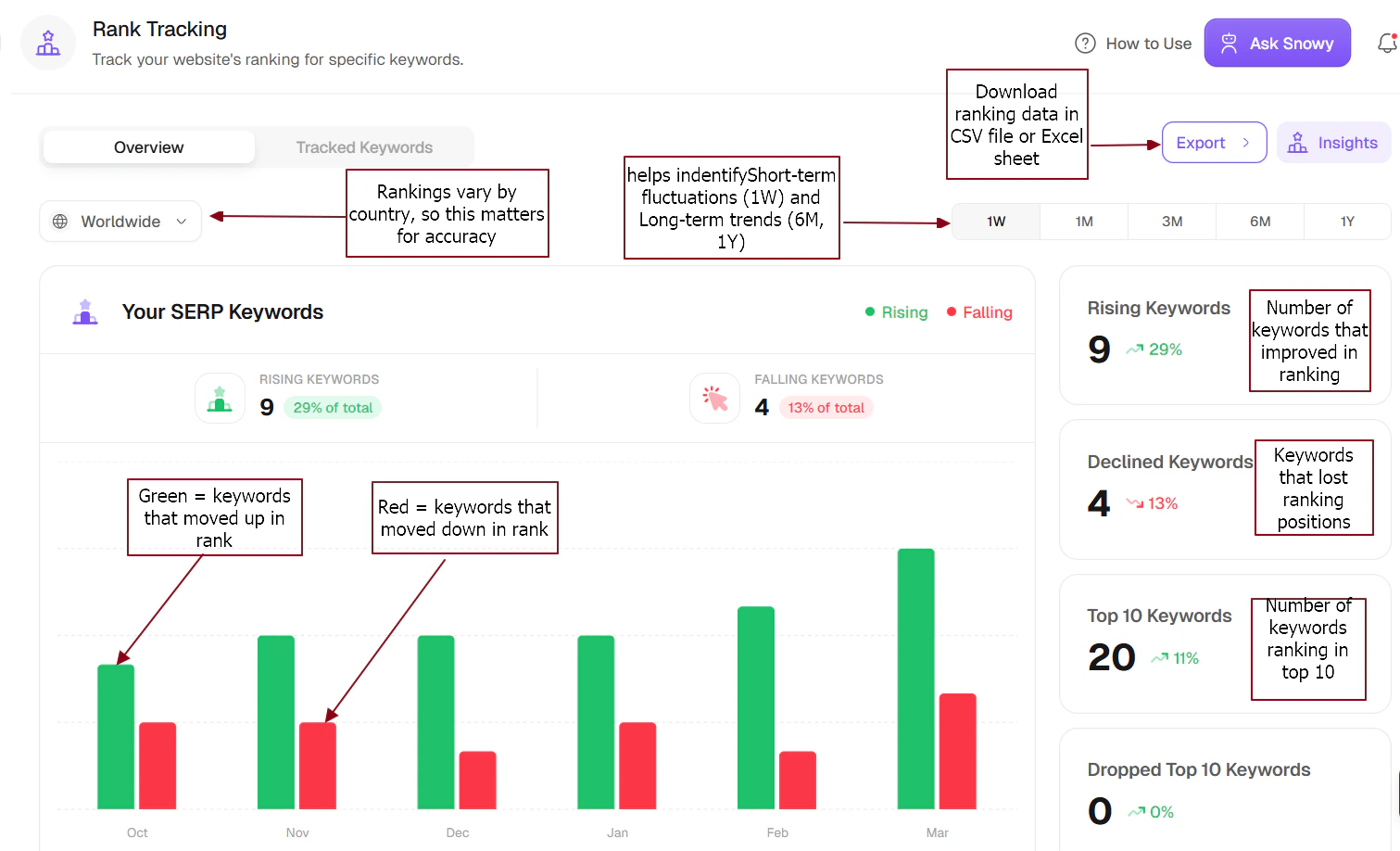
Tracks rankings based on your selected region (e.g., Worldwide, US, UK).
**Why this matters:** Rankings vary significantly by country, so selecting your precise target region ensures maximum accuracy.
Options include **1W, 1M, 3M, 6M, 1Y**. This controls the time period for your analysis.
**Why this matters:** Helps identify both short-term ranking fluctuations (1W) and long-term SEO growth trends (6M, 1Y).
Use **Export** to download your raw ranking data, or **Insights** to view AI-generated analysis and actionable recommendations.
**Why this matters:** Enables deeper analysis, reporting, and data-driven decision-making.
### Keyword Ranking Summary (Main Graph)
The Rank Tracking dashboard highlights which keywords are improving or declining in rankings, helping you identify growth opportunities, protect top positions, and optimize underperforming keywords.
**Key trend interpretation:**
If rising keywords are consistently higher than falling ones (with growth acceleration spikes), it provides the clear insight that your overall SEO performance is steadily improving.
 ### Right-Side Summary Cards
The number of keywords that improved in ranking (e.g., 9 keywords, +29% of total). This is a strong, positive indicator of SEO progress.
Keywords that lost ranking positions (e.g., 4 keywords, -13%). These should be actively monitored, investigated, and targeted for re-optimization.
The number of keywords ranking in the top 10 positions (Page 1 of Google). **Critical metric**: More Top 10 keywords equal exponentially more traffic potential.
Keywords that fell out of the top 10. Seeing 0 here is highly positive, meaning you've sustained your most valuable rankings.
### Right-Side Summary Cards
The number of keywords that improved in ranking (e.g., 9 keywords, +29% of total). This is a strong, positive indicator of SEO progress.
Keywords that lost ranking positions (e.g., 4 keywords, -13%). These should be actively monitored, investigated, and targeted for re-optimization.
The number of keywords ranking in the top 10 positions (Page 1 of Google). **Critical metric**: More Top 10 keywords equal exponentially more traffic potential.
Keywords that fell out of the top 10. Seeing 0 here is highly positive, meaning you've sustained your most valuable rankings.
 ### How This Connects to Website Traffic
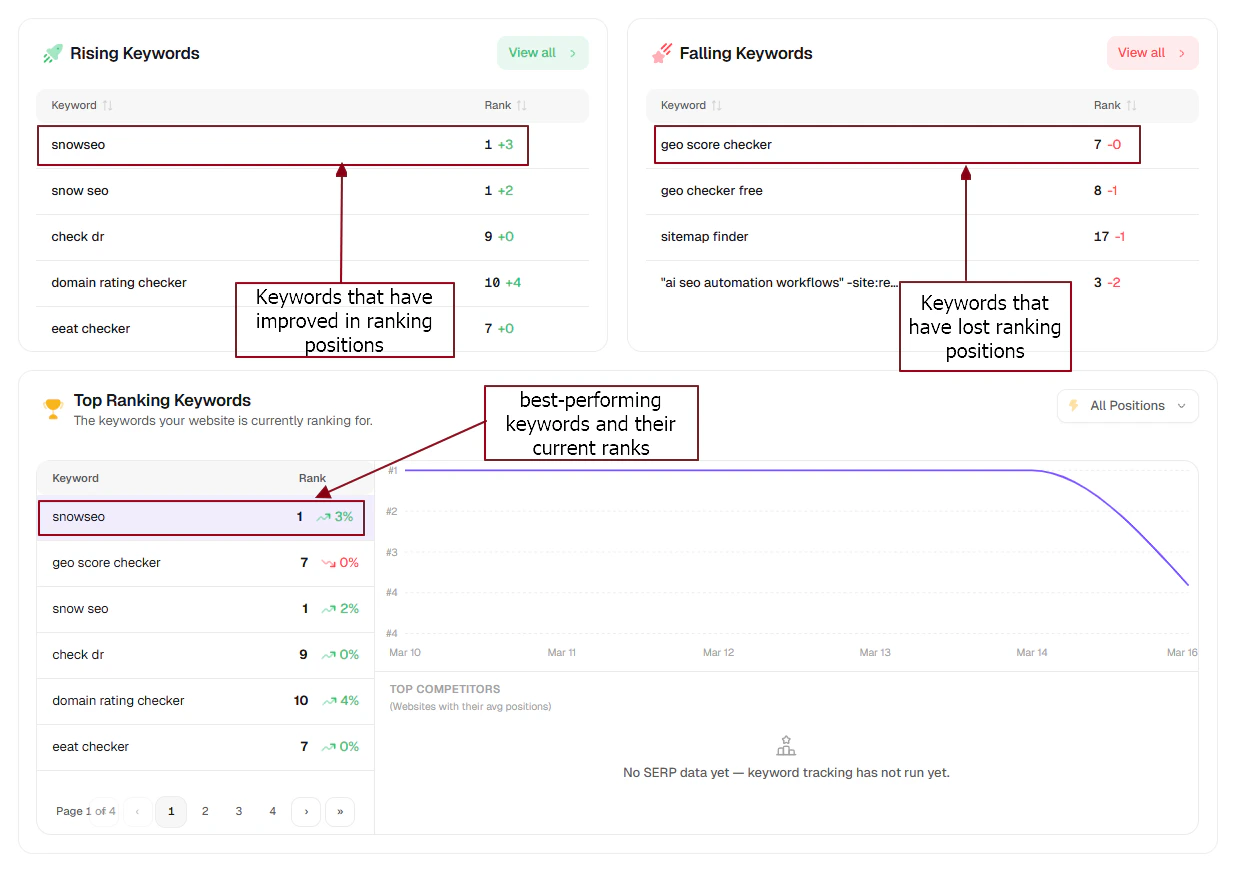
Your keyword movement directly correlates to your traffic outcomes. Here is what the data signals mean:
* **More rising keywords:** Rising keywords are early indicators of future traffic growth — especially if they are approaching the top 10.
* **Falling keywords:** Top 10 keywords are the primary source of your website traffic — optimizing these yields the highest ROI.
* **More Top 10 keywords:** Exponentially higher Click-Through Rates (CTR).
### What You Should Do Next
Identify exactly what is working, structure your internal links around these winners, and expand similar content to capture even more traffic.
Actively update decaying content, improve backlink structures to those lagging pages, and check competitor moves to reclaim lost positions.
Focus on keywords in positions 11-20. Small, targeted content optimizations here represent your single biggest traffic opportunity.
***
## Reading the Dashboard
### What Do the Columns Mean?
| Column | What it tells you |
| -------------------- | ------------------------------------------------------------------- |
| **Current Position** | Where you rank on Google right now |
| **Change (Δ)** | Movement since yesterday - ▲ means you climbed, ▼ means you dropped |
| **Best Position** | The highest you've ever ranked for this keyword - your benchmark |
| **Volume** | Estimated monthly searches for this keyword |
| **URL** | Which page on your site is currently ranking |
### Using Filters to Find Quick Wins
Don't try to monitor every keyword at once - use filters to surface the most actionable data:
These are keywords where you're already on page 1 of Google but not yet in the top 3. The top 3 positions get dramatically more clicks - bumping from position 7 to position 3 can triple your traffic for that keyword. These deserve your attention first.
You're showing up on page 2, which gets very little traffic. But these are close! A targeted content update or a few new backlinks can push them over the line to page 1.
Filter to show only keywords that dropped in the last 7–14 days. These are your fire alarms - investigate content changes, competitor moves, or algorithm updates affecting these pages.
Organize keywords with custom tags (e.g., `Brand`, `Blog`, `Product`, `Competitor`). Filter by tag to measure how specific groups of content are performing as a whole.
***
## Deep Dive: Keyword Detail View
Click any keyword row to open a detailed panel. This is where you diagnose *why* a ranking changed:
A day-by-day line chart of your ranking. Look for steady upward trends vs. sudden spikes or crashes. Gradual drops often signal content decay; sudden drops often signal an algorithm update or technical issue.
Shows special result types appearing for this keyword - Featured Snippets, Local Packs, People Also Ask boxes, Image Carousels. These can push regular results lower and reduce your click-through rate even if your position didn't change.
Which of your pages has ranked for this keyword over time. If multiple pages appear, that's **keyword cannibalization** - two of your pages competing against each other, causing both to rank poorly. Merge or consolidate them.
See which competitor domains jumped above or below you during a ranking shift - useful for understanding if a drop was caused by a competitor improvement rather than something you did wrong.
***
## Frequently Asked Questions
Not immediately. Small fluctuations of 1–5 positions are completely normal. Google runs constant A/B tests on its results, causing daily "dances." Only investigate if the drop persists for more than **5 days**, affects many keywords at once, or coincides with a known Google algorithm update.
SnowSEO automatically surfaces keywords your site is *already ranking for* via Google Search Console. These are shown so you can discover organic opportunities you didn't know about and choose to officially track them with one click.
It means your site either doesn't rank in Google's top 100 results for that keyword yet, or it's a brand-new keyword with no GSC impressions recorded. Give it 48–72 hours. If it still shows N/A after that, consider whether you have any content targeting this keyword.
Rankings update daily. Data is pulled from Google Search Console as soon as Google makes it available for your account - typically by early morning each day for the previous day's data.
Currently, SnowSEO supports rank tracking at the country level. Hyper-local tracking (city, zip code, or neighborhood level) is on our roadmap and coming in a future update.
Keyword cannibalization happens when two or more of your pages target the same keyword - they compete against each other, and Google struggles to decide which one to rank. The fix is to either **merge** them into one comprehensive page, or clearly differentiate the content so each page targets a distinct angle. The **Ranking URL History** in the keyword detail view will flag this for you.
### How This Connects to Website Traffic
Your keyword movement directly correlates to your traffic outcomes. Here is what the data signals mean:
* **More rising keywords:** Rising keywords are early indicators of future traffic growth — especially if they are approaching the top 10.
* **Falling keywords:** Top 10 keywords are the primary source of your website traffic — optimizing these yields the highest ROI.
* **More Top 10 keywords:** Exponentially higher Click-Through Rates (CTR).
### What You Should Do Next
Identify exactly what is working, structure your internal links around these winners, and expand similar content to capture even more traffic.
Actively update decaying content, improve backlink structures to those lagging pages, and check competitor moves to reclaim lost positions.
Focus on keywords in positions 11-20. Small, targeted content optimizations here represent your single biggest traffic opportunity.
***
## Reading the Dashboard
### What Do the Columns Mean?
| Column | What it tells you |
| -------------------- | ------------------------------------------------------------------- |
| **Current Position** | Where you rank on Google right now |
| **Change (Δ)** | Movement since yesterday - ▲ means you climbed, ▼ means you dropped |
| **Best Position** | The highest you've ever ranked for this keyword - your benchmark |
| **Volume** | Estimated monthly searches for this keyword |
| **URL** | Which page on your site is currently ranking |
### Using Filters to Find Quick Wins
Don't try to monitor every keyword at once - use filters to surface the most actionable data:
These are keywords where you're already on page 1 of Google but not yet in the top 3. The top 3 positions get dramatically more clicks - bumping from position 7 to position 3 can triple your traffic for that keyword. These deserve your attention first.
You're showing up on page 2, which gets very little traffic. But these are close! A targeted content update or a few new backlinks can push them over the line to page 1.
Filter to show only keywords that dropped in the last 7–14 days. These are your fire alarms - investigate content changes, competitor moves, or algorithm updates affecting these pages.
Organize keywords with custom tags (e.g., `Brand`, `Blog`, `Product`, `Competitor`). Filter by tag to measure how specific groups of content are performing as a whole.
***
## Deep Dive: Keyword Detail View
Click any keyword row to open a detailed panel. This is where you diagnose *why* a ranking changed:
A day-by-day line chart of your ranking. Look for steady upward trends vs. sudden spikes or crashes. Gradual drops often signal content decay; sudden drops often signal an algorithm update or technical issue.
Shows special result types appearing for this keyword - Featured Snippets, Local Packs, People Also Ask boxes, Image Carousels. These can push regular results lower and reduce your click-through rate even if your position didn't change.
Which of your pages has ranked for this keyword over time. If multiple pages appear, that's **keyword cannibalization** - two of your pages competing against each other, causing both to rank poorly. Merge or consolidate them.
See which competitor domains jumped above or below you during a ranking shift - useful for understanding if a drop was caused by a competitor improvement rather than something you did wrong.
***
## Frequently Asked Questions
Not immediately. Small fluctuations of 1–5 positions are completely normal. Google runs constant A/B tests on its results, causing daily "dances." Only investigate if the drop persists for more than **5 days**, affects many keywords at once, or coincides with a known Google algorithm update.
SnowSEO automatically surfaces keywords your site is *already ranking for* via Google Search Console. These are shown so you can discover organic opportunities you didn't know about and choose to officially track them with one click.
It means your site either doesn't rank in Google's top 100 results for that keyword yet, or it's a brand-new keyword with no GSC impressions recorded. Give it 48–72 hours. If it still shows N/A after that, consider whether you have any content targeting this keyword.
Rankings update daily. Data is pulled from Google Search Console as soon as Google makes it available for your account - typically by early morning each day for the previous day's data.
Currently, SnowSEO supports rank tracking at the country level. Hyper-local tracking (city, zip code, or neighborhood level) is on our roadmap and coming in a future update.
Keyword cannibalization happens when two or more of your pages target the same keyword - they compete against each other, and Google struggles to decide which one to rank. The fix is to either **merge** them into one comprehensive page, or clearly differentiate the content so each page targets a distinct angle. The **Ranking URL History** in the keyword detail view will flag this for you.